> ## Documentation Index
> Fetch the complete documentation index at: https://noradocs.solomontsao.com/llms.txt
> Use this file to discover all available pages before exploring further.
# Alert rules
# Alert rules
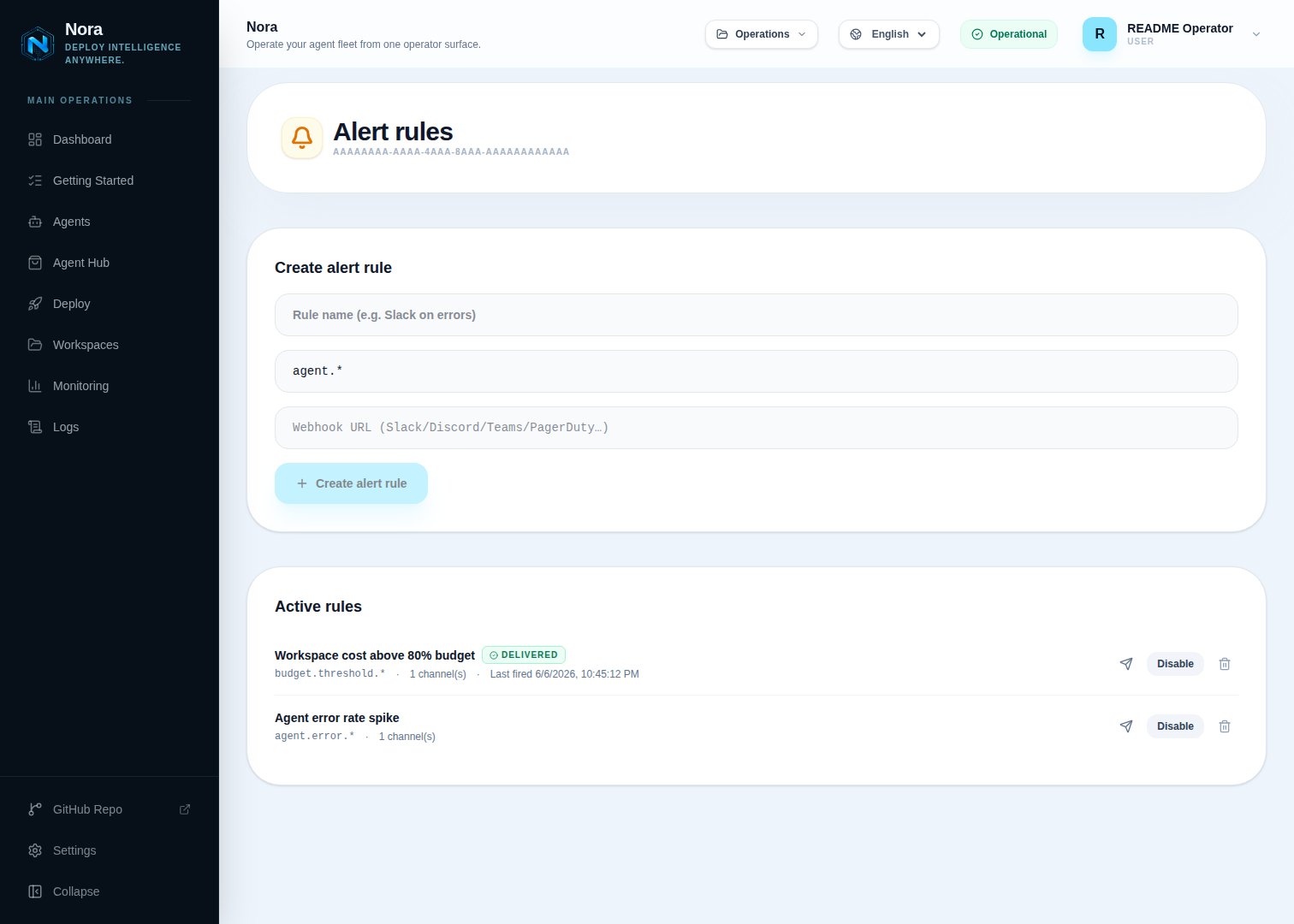
> Match emitted Nora events by pattern and deliver them to webhook or email channels with automatic retry. Workspace-scoped, configured per workspace from Settings.
Alert rules let a workspace listen for specific event types and forward each match to one or more delivery channels. A rule has an event pattern (literal or suffix glob), a list of channels, and an enabled toggle. Rules only fire for events emitted within the same workspace.
 ## Event patterns
A pattern matches an event type using one of three forms:
| Pattern | Example matches | Notes |
| ----------- | ------------------------------------------------------------------------ | ---------------------------------------------- |
| Literal | `agent.budget_paused` matches only `agent.budget_paused` | Exact string match. |
| Suffix glob | `agent.*` matches `agent.budget_paused`, `agent.budget_updated`, `agent` | The trailing `.*` matches one segment or none. |
| Wildcard | `*` matches every event type | Useful for catch-all monitoring rules. |
Common event types include `agent_deployed`, `agent_stopped`, `backup_agent_queued`, `agent_hub_published`, `workspace_invitation_accepted`, and `agent.budget_paused`. Most event types use underscores (e.g. `agent_deployed`, `workspace_invitation_accepted`); the dot-delimited form is reserved for budget events (`agent.budget_*`). The full list grows over time — point a `*` rule at a webhook in a staging workspace to discover what's emitted.
## Channels
## Event patterns
A pattern matches an event type using one of three forms:
| Pattern | Example matches | Notes |
| ----------- | ------------------------------------------------------------------------ | ---------------------------------------------- |
| Literal | `agent.budget_paused` matches only `agent.budget_paused` | Exact string match. |
| Suffix glob | `agent.*` matches `agent.budget_paused`, `agent.budget_updated`, `agent` | The trailing `.*` matches one segment or none. |
| Wildcard | `*` matches every event type | Useful for catch-all monitoring rules. |
Common event types include `agent_deployed`, `agent_stopped`, `backup_agent_queued`, `agent_hub_published`, `workspace_invitation_accepted`, and `agent.budget_paused`. Most event types use underscores (e.g. `agent_deployed`, `workspace_invitation_accepted`); the dot-delimited form is reserved for budget events (`agent.budget_*`). The full list grows over time — point a `*` rule at a webhook in a staging workspace to discover what's emitted.
## Channels
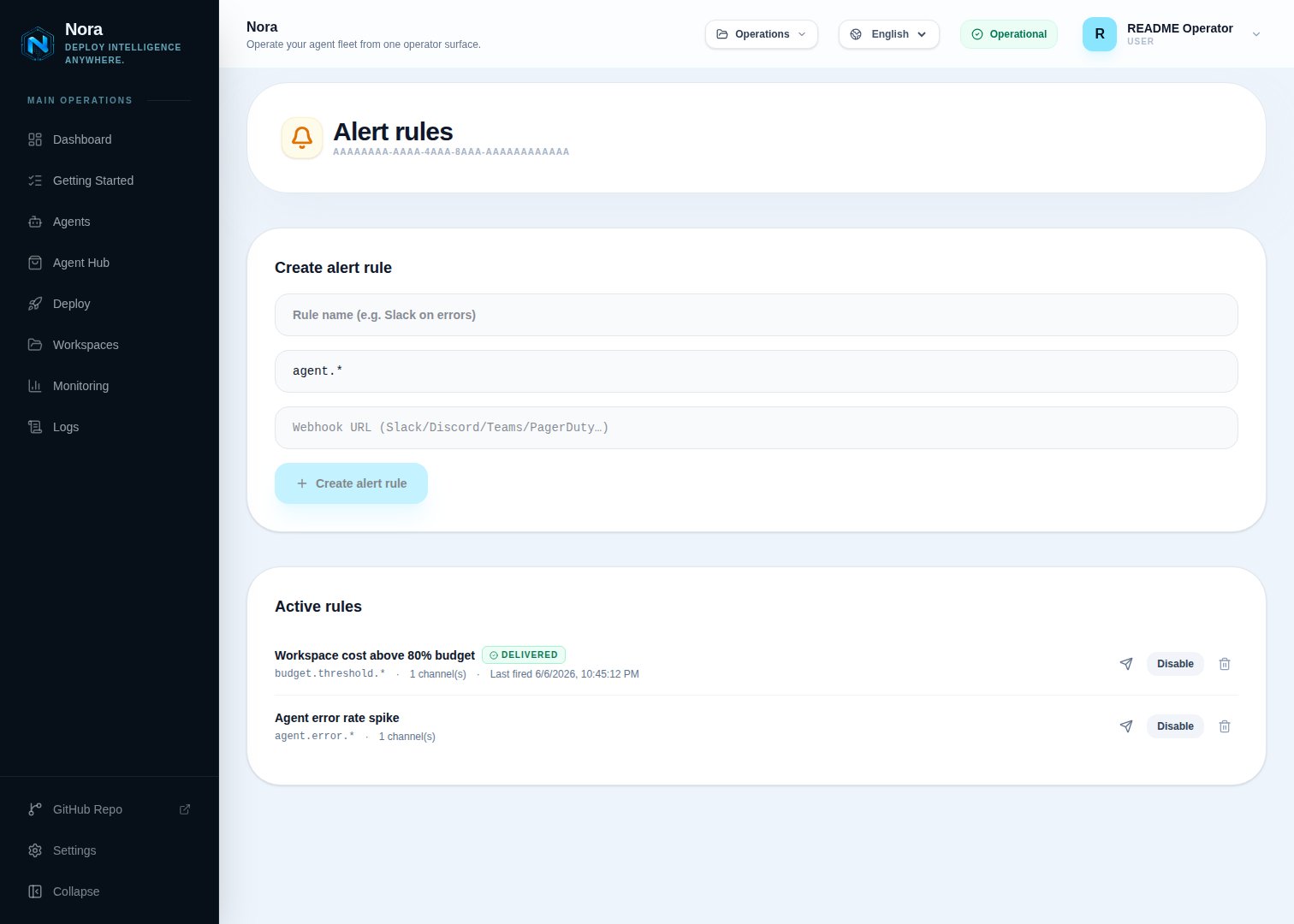 A rule must define at least one channel. Channels are objects on the rule body.
### Webhook
```json theme={null} theme={null}
{
"type": "webhook",
"url": "https://hooks.example.com/nora",
"headers": { "Authorization": "Bearer ..." }
}
```
Webhooks POST a JSON body to `url` with optional custom headers. Each delivery is enqueued to the BullMQ `alert-deliveries` queue and retried with exponential backoff up to `ALERT_DELIVERY_ATTEMPTS` times (default 5). Every job carries a stable `deliveryId` — webhook receivers should dedupe on it.
The body posted to your endpoint:
```json theme={null} theme={null}
{
"eventType": "agent_stopped",
"message": "Agent stopped unexpectedly",
"metadata": { "agent": { "id": "..." }, "workspace": { "id": "..." } },
"firedAt": "2026-05-07T00:00:00Z",
"ruleId": "...",
"ruleName": "Production errors",
"deliveryId": "..."
}
```
Metadata is clamped to 8 KiB before queueing to keep Redis usage bounded. Pathologically large payloads are replaced with `{ truncated: true, originalBytes, workspace, agent }`.
### Email
```json theme={null} theme={null}
{
"type": "email",
"to": ["ops@example.com"],
"subjectPrefix": "PROD"
}
```
Email channels deliver inline through the platform mailer. Up to ten recipients per channel; a `subjectPrefix` is bracketed into the subject line. Email channels use the mailer's own retry semantics — if delivery fails, the rule's `lastError` records the reason synchronously.
## Lifecycle and observability
Each rule tracks two timestamps:
* `lastFiredAt` — last time the pattern matched an event in the workspace.
* `lastError` — most recent terminal delivery failure across all channels for this rule. Webhook failures populate this only after BullMQ exhausts retries; email failures populate it inline.
These surface in the dashboard under **Settings → Alert rules** and via the [Alert rules API](/api/alert-rules).
## Permissions
| Capability | Required role |
| ------------------------ | ------------- |
| List rules | viewer |
| Create / update / delete | admin |
| Send a test event | admin |
## Troubleshooting
BullMQ retries `ALERT_DELIVERY_ATTEMPTS` times (default 5) with exponential backoff. After the final attempt fails, `lastError` shows `webhook:Webhook returned `. Check the receiver, then trigger a test event from the rule editor to re-fire delivery.
The platform mailer isn't configured. Set up SMTP in Admin Settings (or set `MAILER_*` env vars), then resend.
Rules filter by `metadata.workspace.id` on each event. If you see cross-workspace fires, the emitter is missing workspace metadata — file an issue with the event type.
A rule must define at least one channel. Channels are objects on the rule body.
### Webhook
```json theme={null} theme={null}
{
"type": "webhook",
"url": "https://hooks.example.com/nora",
"headers": { "Authorization": "Bearer ..." }
}
```
Webhooks POST a JSON body to `url` with optional custom headers. Each delivery is enqueued to the BullMQ `alert-deliveries` queue and retried with exponential backoff up to `ALERT_DELIVERY_ATTEMPTS` times (default 5). Every job carries a stable `deliveryId` — webhook receivers should dedupe on it.
The body posted to your endpoint:
```json theme={null} theme={null}
{
"eventType": "agent_stopped",
"message": "Agent stopped unexpectedly",
"metadata": { "agent": { "id": "..." }, "workspace": { "id": "..." } },
"firedAt": "2026-05-07T00:00:00Z",
"ruleId": "...",
"ruleName": "Production errors",
"deliveryId": "..."
}
```
Metadata is clamped to 8 KiB before queueing to keep Redis usage bounded. Pathologically large payloads are replaced with `{ truncated: true, originalBytes, workspace, agent }`.
### Email
```json theme={null} theme={null}
{
"type": "email",
"to": ["ops@example.com"],
"subjectPrefix": "PROD"
}
```
Email channels deliver inline through the platform mailer. Up to ten recipients per channel; a `subjectPrefix` is bracketed into the subject line. Email channels use the mailer's own retry semantics — if delivery fails, the rule's `lastError` records the reason synchronously.
## Lifecycle and observability
Each rule tracks two timestamps:
* `lastFiredAt` — last time the pattern matched an event in the workspace.
* `lastError` — most recent terminal delivery failure across all channels for this rule. Webhook failures populate this only after BullMQ exhausts retries; email failures populate it inline.
These surface in the dashboard under **Settings → Alert rules** and via the [Alert rules API](/api/alert-rules).
## Permissions
| Capability | Required role |
| ------------------------ | ------------- |
| List rules | viewer |
| Create / update / delete | admin |
| Send a test event | admin |
## Troubleshooting
BullMQ retries `ALERT_DELIVERY_ATTEMPTS` times (default 5) with exponential backoff. After the final attempt fails, `lastError` shows `webhook:Webhook returned `. Check the receiver, then trigger a test event from the rule editor to re-fire delivery.
The platform mailer isn't configured. Set up SMTP in Admin Settings (or set `MAILER_*` env vars), then resend.
Rules filter by `metadata.workspace.id` on each event. If you see cross-workspace fires, the emitter is missing workspace metadata — file an issue with the event type.