> ## Documentation Index
> Fetch the complete documentation index at: https://noradocs.solomontsao.com/llms.txt
> Use this file to discover all available pages before exploring further.
# Backups
# Managed agent backups
> Snapshot an agent's persistent state on demand or on a schedule, store the encrypted archive locally or in S3 / R2 / SSH, and restore from any backup into a new agent.
Nora's managed-backup tier captures an agent's container state — files, integrations, and runtime data — into an encrypted archive and stores it in the destination you configure. Backups run as BullMQ jobs in a dedicated worker so deploys aren't impacted. Restores create a new agent from the archive (in-place restore is admin-only and not exposed via the public API).
## Storage destinations
`NORA_BACKUP_STORAGE` selects where archives go. Supported values:
| Destination | Configuration |
| ----------- | ----------------------------------------------------------------------------- |
| `local` | Default. Archives live in the `nora_backups` Docker volume. |
| `s3` | AWS S3 or any S3-compatible service. Set `NORA_BACKUP_S3_*` env vars. |
| `r2` | Cloudflare R2. Set `NORA_BACKUP_R2_*` plus the account-specific endpoint URL. |
| `ssh` | SSH/SFTP upload to a remote host. Set `NORA_BACKUP_SSH_*` env vars. |
Credentials can be set via env at startup or managed at runtime from **Admin Settings → Backups**. See the [environment variable reference](/configuration/environment-variables#managed-backups) for the full list.
`NORA_BACKUP_ENCRYPTION_KEY` must be set before creating the first backup. Archives are sealed with this key — rotating it makes existing archives unrecoverable.
## Capture an on-demand backup
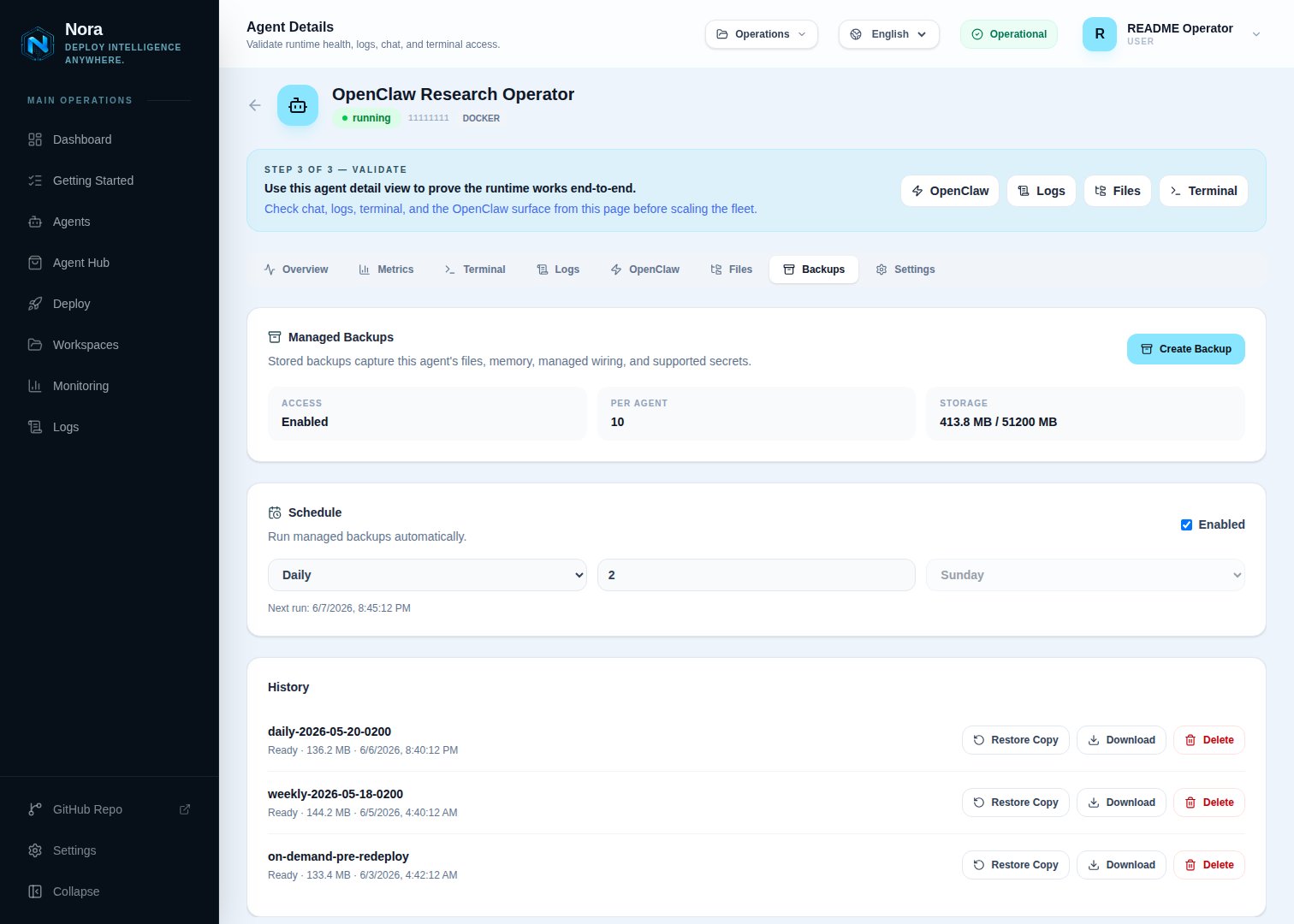 Navigate to the agent you want to back up.
Click **Backups** in the agent's secondary navigation. The panel shows existing backups with their size, creation time, and status.
Optionally name the backup (defaults to a timestamped label). Confirm. Nora queues a backup job on the `backups` queue and the panel shows it as `queued`. The backup worker (`workers/backup`) picks it up, snapshots the agent state, encrypts the archive, and uploads it to the configured destination.
Backup jobs have a hard `Promise.race` timeout of `NORA_BACKUP_JOB_TIMEOUT_MS` (default 30 minutes). Long-running snapshots are aborted at the timeout — agents holding open large datasets may need a higher value.
The backup transitions through `queued` → `running` → `ready` / `ready_with_warnings` (or `failed`). When complete, the **Download** action becomes available.
## Schedule recurring backups
Navigate to the agent you want to back up.
Click **Backups** in the agent's secondary navigation. The panel shows existing backups with their size, creation time, and status.
Optionally name the backup (defaults to a timestamped label). Confirm. Nora queues a backup job on the `backups` queue and the panel shows it as `queued`. The backup worker (`workers/backup`) picks it up, snapshots the agent state, encrypts the archive, and uploads it to the configured destination.
Backup jobs have a hard `Promise.race` timeout of `NORA_BACKUP_JOB_TIMEOUT_MS` (default 30 minutes). Long-running snapshots are aborted at the timeout — agents holding open large datasets may need a higher value.
The backup transitions through `queued` → `running` → `ready` / `ready_with_warnings` (or `failed`). When complete, the **Download** action becomes available.
## Schedule recurring backups
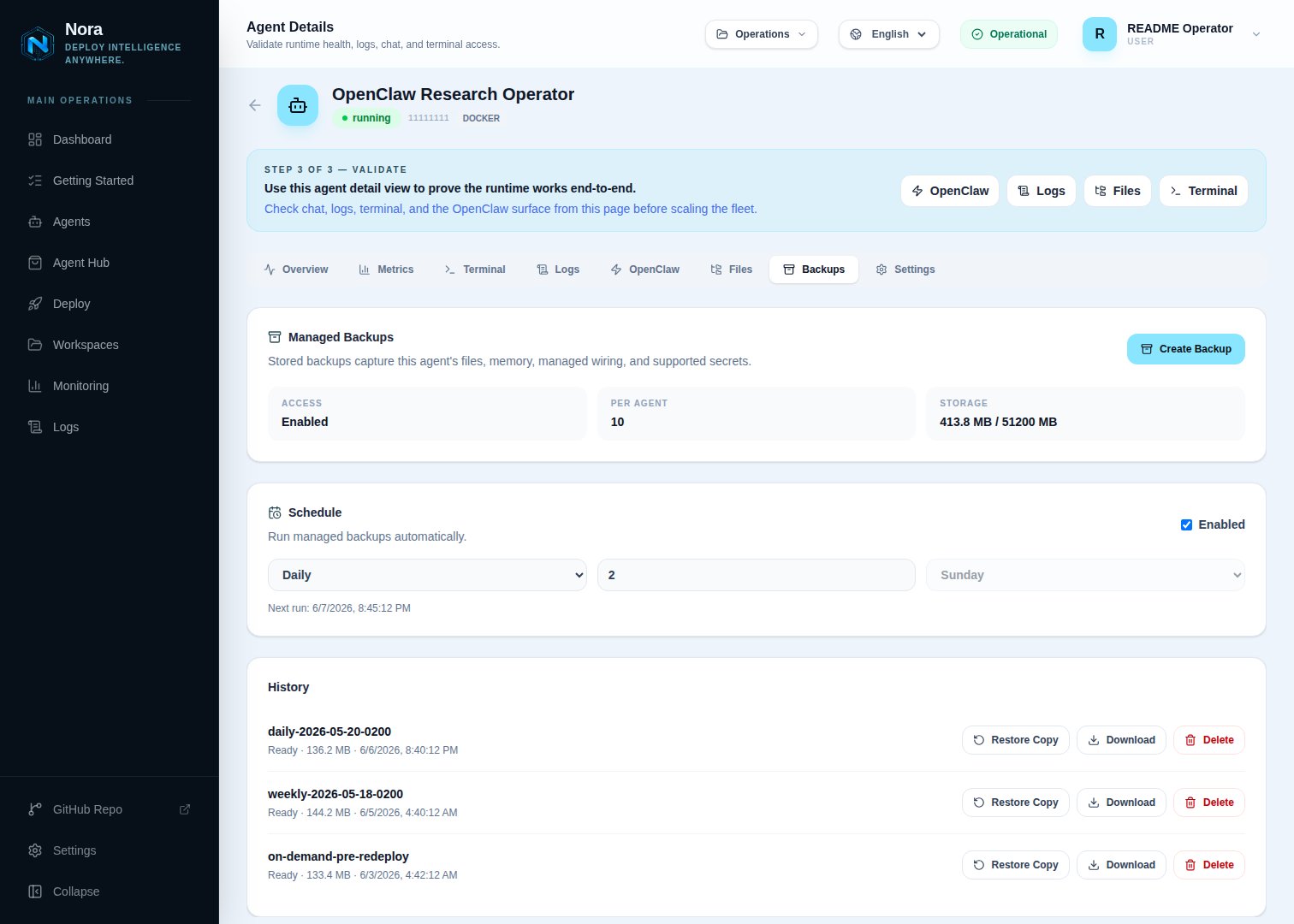 Each agent has its own schedule. From the Backups panel, click **Schedule**:
| Field | Notes |
| --------------- | ------------------------------------------------------------------ |
| **Enabled** | Master toggle for the schedule. |
| **Frequency** | One of `hourly`, `daily`, `weekly`. |
| **Retain** | How many scheduled backups to keep before pruning the oldest. |
| **Next run at** | Computed from the frequency and the most recent successful backup. |
The backup worker polls every `NORA_BACKUP_SCHEDULE_POLL_MS` (default 60 seconds) for due schedules and enqueues a job for each. Manual backups don't count against the scheduled retention.
## Restore from a backup
The public API exposes **copy** restore only — it materializes the backup into a new agent in your workspace, leaving the original agent untouched.
From the agent's Backups panel, click the **Restore** action on any `ready` (or `ready_with_warnings`) backup.
Choose the workspace and an agent name for the restored copy. Click **Create restore draft**.
Nora creates a new agent in `queued` status seeded from the backup's snapshot. The deploy follows the standard agent lifecycle — verify the agent reaches `running`, then point traffic at it.
## Retention and limits
Two settings cap storage usage:
| Setting | Default | What it bounds |
| ----------------------------- | ------- | ------------------------------------------------------------------------------ |
| `NORA_BACKUP_LIMIT_PER_AGENT` | `10` | Max backups retained per agent. Older entries are pruned automatically. |
| `NORA_BACKUP_STORAGE_MB` | `51200` | Soft cap on total backup storage. Workspace creation is gated on this cap. |
| `NORA_BACKUP_RETENTION_DAYS` | `30` | Days to keep expired/scheduled backups before background pruning removes them. |
PaaS deployments override these per subscription tier. See [Platform modes](/configuration/platform-modes).
## Permissions
| Capability | Required role |
| ----------------------------------- | ---------------------------------------- |
| List backups for an agent | agent owner |
| Create a backup or schedule | agent owner |
| Download an archive | agent owner |
| Delete a backup | agent owner |
| Create a copy-restore draft | agent owner |
| In-place restore (overwrite source) | platform admin only — not via public API |
## Troubleshooting
Check that the `worker-backup` container is running. Its health endpoint is `http://worker-backup:4002/health`. If unhealthy, the BullMQ `backups` queue has nothing draining it.
`NORA_BACKUP_ENCRYPTION_KEY` was rotated. Old archives can't be decrypted with a new key. Roll the key back temporarily, restore, then re-key. There's no recovery path if both the old key and a copy of the archive are lost.
Verify the bucket policy allows `s3:PutObject` for the configured access key on the bucket and prefix Nora is writing to. Cloudflare R2 also requires the account-specific endpoint URL, not the AWS endpoint.
The SSH destination uses sftp under the hood. Check that the remote user can write to `NORA_BACKUP_SSH_REMOTE_PATH` and that the host is reachable from inside the `worker-backup` container.
Each agent has its own schedule. From the Backups panel, click **Schedule**:
| Field | Notes |
| --------------- | ------------------------------------------------------------------ |
| **Enabled** | Master toggle for the schedule. |
| **Frequency** | One of `hourly`, `daily`, `weekly`. |
| **Retain** | How many scheduled backups to keep before pruning the oldest. |
| **Next run at** | Computed from the frequency and the most recent successful backup. |
The backup worker polls every `NORA_BACKUP_SCHEDULE_POLL_MS` (default 60 seconds) for due schedules and enqueues a job for each. Manual backups don't count against the scheduled retention.
## Restore from a backup
The public API exposes **copy** restore only — it materializes the backup into a new agent in your workspace, leaving the original agent untouched.
From the agent's Backups panel, click the **Restore** action on any `ready` (or `ready_with_warnings`) backup.
Choose the workspace and an agent name for the restored copy. Click **Create restore draft**.
Nora creates a new agent in `queued` status seeded from the backup's snapshot. The deploy follows the standard agent lifecycle — verify the agent reaches `running`, then point traffic at it.
## Retention and limits
Two settings cap storage usage:
| Setting | Default | What it bounds |
| ----------------------------- | ------- | ------------------------------------------------------------------------------ |
| `NORA_BACKUP_LIMIT_PER_AGENT` | `10` | Max backups retained per agent. Older entries are pruned automatically. |
| `NORA_BACKUP_STORAGE_MB` | `51200` | Soft cap on total backup storage. Workspace creation is gated on this cap. |
| `NORA_BACKUP_RETENTION_DAYS` | `30` | Days to keep expired/scheduled backups before background pruning removes them. |
PaaS deployments override these per subscription tier. See [Platform modes](/configuration/platform-modes).
## Permissions
| Capability | Required role |
| ----------------------------------- | ---------------------------------------- |
| List backups for an agent | agent owner |
| Create a backup or schedule | agent owner |
| Download an archive | agent owner |
| Delete a backup | agent owner |
| Create a copy-restore draft | agent owner |
| In-place restore (overwrite source) | platform admin only — not via public API |
## Troubleshooting
Check that the `worker-backup` container is running. Its health endpoint is `http://worker-backup:4002/health`. If unhealthy, the BullMQ `backups` queue has nothing draining it.
`NORA_BACKUP_ENCRYPTION_KEY` was rotated. Old archives can't be decrypted with a new key. Roll the key back temporarily, restore, then re-key. There's no recovery path if both the old key and a copy of the archive are lost.
Verify the bucket policy allows `s3:PutObject` for the configured access key on the bucket and prefix Nora is writing to. Cloudflare R2 also requires the account-specific endpoint URL, not the AWS endpoint.
The SSH destination uses sftp under the hood. Check that the remote user can write to `NORA_BACKUP_SSH_REMOTE_PATH` and that the host is reachable from inside the `worker-backup` container.