> ## Documentation Index
> Fetch the complete documentation index at: https://noradocs.solomontsao.com/llms.txt
> Use this file to discover all available pages before exploring further.
# Channels
# Configure agent channels
> Link or configure the communication channel an agent uses to reach you.
Channels are the communication endpoints attached to an agent. For current OpenClaw agents, Nora manages channels through the running OpenClaw gateway: the **Channels** tab lists the OpenClaw catalog, opens setup forms for supported channel configs, and starts QR or CLI pairing flows where the runtime supports them.
Legacy non-OpenClaw agents use Nora's database-backed channel adapters instead. That older flow still supports create, test-message, message-history, and delete actions.
## OpenClaw channel catalog
OpenClaw agents show catalog rows even before they are configured. A row becomes configured after you save setup fields or complete the pairing flow.
| Channel kind | OpenClaw types |
| ------------------------- | ------------------------------------------------------------------------------------------------------------------------------------------------------------------------------------- |
| Pairing/link flow | WhatsApp, Feishu/Lark, Zalo Personal Account |
| Bot or API setup | Discord, Google Chat, LINE, Mattermost, Matrix, Microsoft Teams Bot Framework, Nextcloud Talk, Nostr, QQ Bot, Signal, Slack, Synology Chat, Telegram, Tlon, Twitch, Yuanbao, Zalo Bot |
| Local/self-hosted bridges | BlueBubbles, iMessage, IRC |
OpenClaw WhatsApp uses the **Link** / QR pairing flow in Nora. Do not paste a Meta Phone Number ID
or WhatsApp Cloud API access token into the OpenClaw channel setup. Those fields belonged to the
older legacy WhatsApp adapter.
## Connect an OpenClaw channel
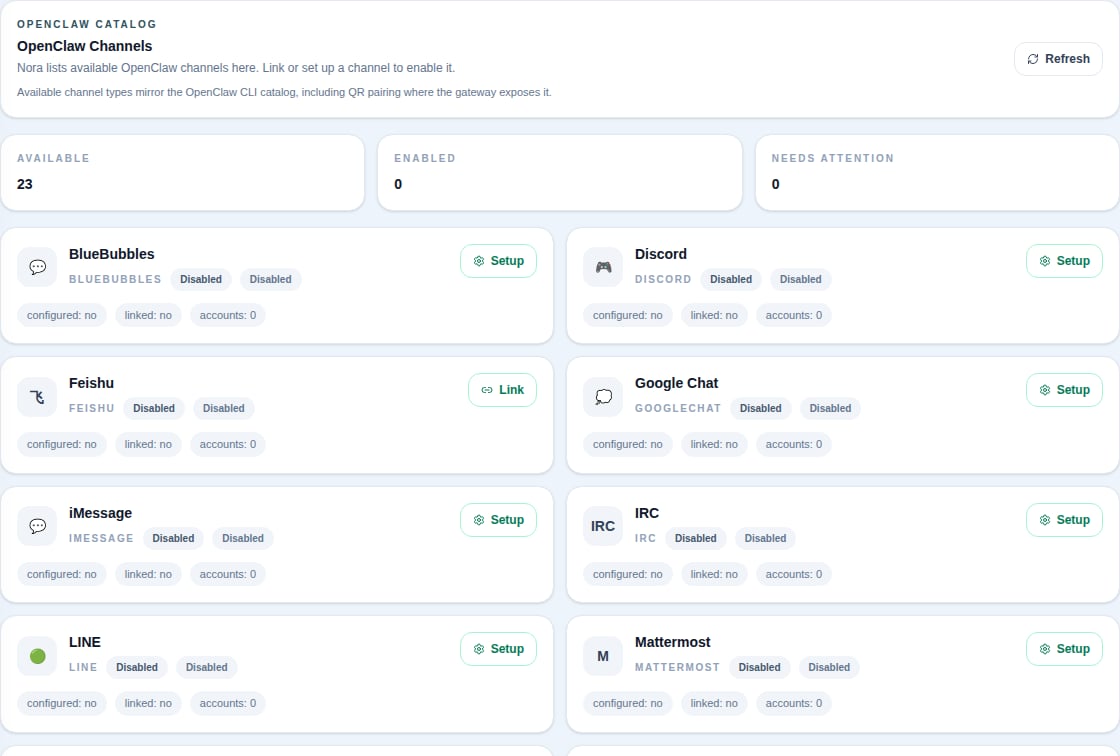 Navigate to the agent detail page, open **OpenClaw**, then select **Channels**.
Choose the catalog row you want to use. You only need one channel for agent-to-operator messages.
For WhatsApp, click **Link** and scan or complete the pairing prompt. Feishu/Lark and Zalo
Personal Account use OpenClaw's CLI pairing flow when available.
For Telegram, Slack, Discord, LINE, Matrix, and similar channels, click **Setup**, fill the fields Nora shows, then save. Nora writes the config through the OpenClaw config API and asks the runtime to reload.
## What actions are available?
| Action | OpenClaw channels | Legacy Nora adapters |
| ------------------------- | -------------------------------------------- | -------------------- |
| List channels | Yes, catalog rows | Yes, configured rows |
| Setup or edit config | Yes | Yes |
| Link / QR login | WhatsApp, Feishu/Lark, Zalo Personal Account | No |
| Disable / enable | Yes, after configured | Yes |
| Logout | WhatsApp, Telegram, QQ Bot where linked | No |
| Send test message | Not exposed by Nora for OpenClaw | Yes |
| View Nora message history | Not exposed by Nora for OpenClaw | Yes |
| Delete channel row | No; disable instead | Yes |
If an OpenClaw channel setup fails, start by checking that the agent is **running** or **warning** and that the OpenClaw gateway is reachable. Setup and link actions are runtime operations, so stopped agents cannot service them.
## Legacy channel adapters
Legacy agents still use Nora's built-in adapters. Sensitive configuration values such as tokens, webhook URLs, and passwords are encrypted with AES-256-GCM before storage and shown as `[REDACTED]` in API responses.
| Type | Label | Required credentials |
| ---------- | ------------------ | -------------------------------------------------------- |
| `slack` | Slack | Webhook URL; bot token optional |
| `discord` | Discord | Webhook URL; bot token optional |
| `email` | Email (SMTP) | SMTP host, port, username, password, from address |
| `webhook` | Webhook | Target URL; method, headers, and signing secret optional |
| `teams` | Microsoft Teams | Incoming webhook URL |
| `sms` | SMS (Twilio) | Account SID, auth token, from number |
| `whatsapp` | WhatsApp Cloud API | Phone Number ID, access token |
| `telegram` | Telegram | Bot token; chat ID optional |
| `line` | LINE | Channel access token; channel secret optional |
Legacy channels can be tested from the Channels tab. Nora verifies the configuration and sends a test message through the adapter. OpenClaw-managed channels do not use this legacy Test action.
Navigate to the agent detail page, open **OpenClaw**, then select **Channels**.
Choose the catalog row you want to use. You only need one channel for agent-to-operator messages.
For WhatsApp, click **Link** and scan or complete the pairing prompt. Feishu/Lark and Zalo
Personal Account use OpenClaw's CLI pairing flow when available.
For Telegram, Slack, Discord, LINE, Matrix, and similar channels, click **Setup**, fill the fields Nora shows, then save. Nora writes the config through the OpenClaw config API and asks the runtime to reload.
## What actions are available?
| Action | OpenClaw channels | Legacy Nora adapters |
| ------------------------- | -------------------------------------------- | -------------------- |
| List channels | Yes, catalog rows | Yes, configured rows |
| Setup or edit config | Yes | Yes |
| Link / QR login | WhatsApp, Feishu/Lark, Zalo Personal Account | No |
| Disable / enable | Yes, after configured | Yes |
| Logout | WhatsApp, Telegram, QQ Bot where linked | No |
| Send test message | Not exposed by Nora for OpenClaw | Yes |
| View Nora message history | Not exposed by Nora for OpenClaw | Yes |
| Delete channel row | No; disable instead | Yes |
If an OpenClaw channel setup fails, start by checking that the agent is **running** or **warning** and that the OpenClaw gateway is reachable. Setup and link actions are runtime operations, so stopped agents cannot service them.
## Legacy channel adapters
Legacy agents still use Nora's built-in adapters. Sensitive configuration values such as tokens, webhook URLs, and passwords are encrypted with AES-256-GCM before storage and shown as `[REDACTED]` in API responses.
| Type | Label | Required credentials |
| ---------- | ------------------ | -------------------------------------------------------- |
| `slack` | Slack | Webhook URL; bot token optional |
| `discord` | Discord | Webhook URL; bot token optional |
| `email` | Email (SMTP) | SMTP host, port, username, password, from address |
| `webhook` | Webhook | Target URL; method, headers, and signing secret optional |
| `teams` | Microsoft Teams | Incoming webhook URL |
| `sms` | SMS (Twilio) | Account SID, auth token, from number |
| `whatsapp` | WhatsApp Cloud API | Phone Number ID, access token |
| `telegram` | Telegram | Bot token; chat ID optional |
| `line` | LINE | Channel access token; channel secret optional |
Legacy channels can be tested from the Channels tab. Nora verifies the configuration and sends a test message through the adapter. OpenClaw-managed channels do not use this legacy Test action.