> ## Documentation Index
> Fetch the complete documentation index at: https://noradocs.solomontsao.com/llms.txt
> Use this file to discover all available pages before exploring further.
# Deploy agent
# Deploy and manage AI agents in Nora
> Learn how to deploy, configure, start, stop, and delete AI agents from the Nora dashboard, including sandbox types and lifecycle states.
Nora gives you a single place to deploy and operate AI agent runtimes. From the Deploy page you
choose the runtime family, one exact execution target, resource allocation, and sandbox profile, then
Nora queues the deployment, provisions the runtime, and brings the agent online. Once an agent is
running, you can chat with it, inspect its logs, and open an interactive terminal — all from the same
dashboard.
## Before you start
Make sure you have at least one LLM provider key saved in **Settings** before deploying. Agents need a provider key to run chat workflows. See [Add and sync LLM provider keys](/guides/manage-providers) to set one up.
## Deploy an agent
Navigate to **Deploy** in the sidebar. This is the starting point for every new agent.
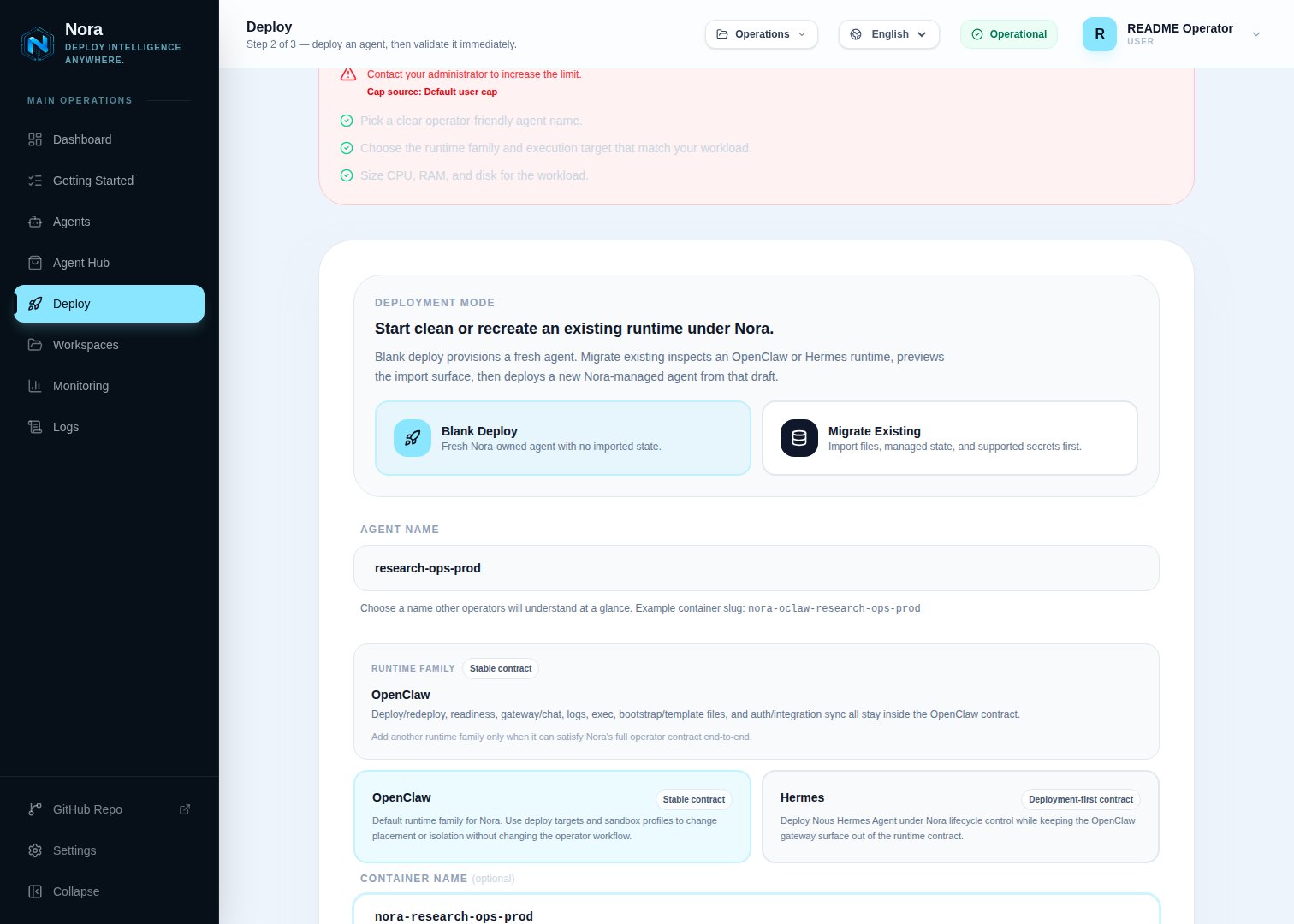 Type a name for your agent. Names are limited to 100 characters. If you leave the field blank,
Nora generates a default name such as `OpenClaw-Agent-472`.
Select **OpenClaw** or **Hermes** when more than one family is enabled. The runtime family controls
the agent contract; it does not decide where the workload runs.
Type a name for your agent. Names are limited to 100 characters. If you leave the field blank,
Nora generates a default name such as `OpenClaw-Agent-472`.
Select **OpenClaw** or **Hermes** when more than one family is enabled. The runtime family controls
the agent contract; it does not decide where the workload runs.
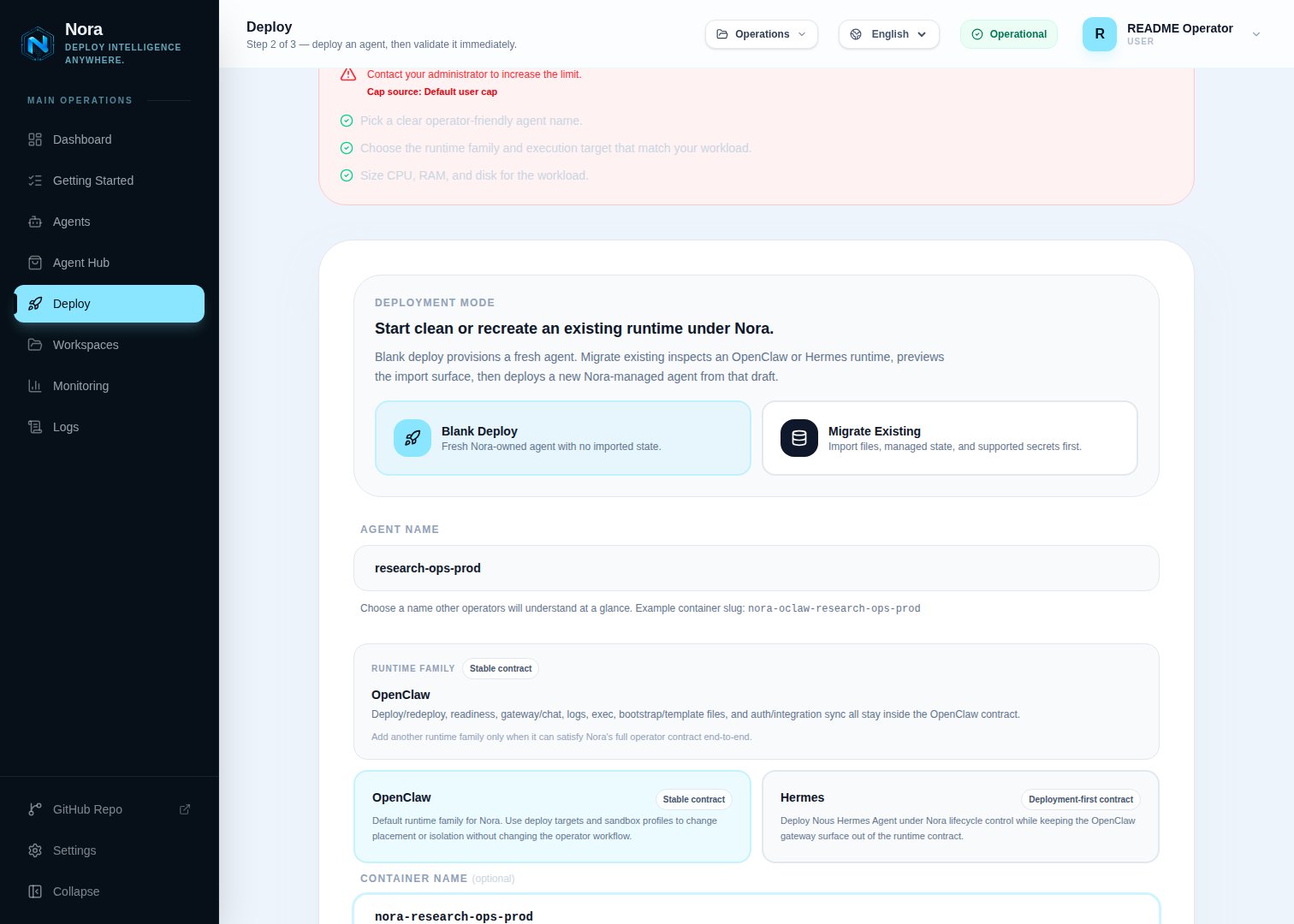 Select the exact destination: local Docker, a registered `k8s:` cluster, a registered
`remote:` Docker host, or another enabled experimental target. Nora records that concrete
target on the agent and does not automatically place, fail over, or rebalance it onto a different
target.
A Remote Docker host appears only when its latest manual connection test succeeded and you can
deploy to it. Personal hosts allow their owner plus `editor`, `admin`, or `owner` members of a
granted workspace. Platform hosts allow platform admins, all accounts when enabled, directly
granted users, matching user groups, and `editor+` members of a granted workspace. Workspace
viewers can see the host but cannot select it. The current picker exposes Remote Docker only for
OpenClaw; see the
[Remote Docker backend reference](/configuration/provisioner-backends/remote-docker#hermes-advanced-api-path)
for the experimental Hermes API path.
Select the sandbox that will run your agent. See the [sandbox comparison table](#sandbox-types)
below for details on each option. Hermes supports only the standard profile.
Specify the vCPU count, RAM (MB), and requested disk size (GB). In self-hosted mode these values
are clamped to the operator-configured limits. In PaaS mode Nora uses the platform-wide deployment
defaults configured by the operator; plan tiers currently control deployment count rather than
per-agent resource sizes. Docker and Remote Docker enforce the CPU and memory settings, but
`disk_gb` is deployment metadata, not a Docker storage quota. Monitor the host filesystem, images,
volumes, writable layers, and logs, and verify the selected host has enough aggregate headroom
before deploying.
Blank deploys include a per-family skills step: the primary button reads **Next: Choose
Skills** and opens the skills picker for the selected runtime family. OpenClaw agents pick
from **ClawHub**. Hermes agents pick from the **Hermes Skills Hub**, with your instance's
curated **Skills Library** shown first for one-click selection — any operator can pin a skill
to the shared library from the picker's detail panel or from a running Hermes agent's Skills
tab. Selected skills are saved on the agent record and installed automatically once the
runtime is ready. Adopting an external runtime skips this step, and you can always continue
without selecting any skills.
Click **Deploy Agent & Open Validation** on the skills page. Nora creates the agent record with a `queued` status and adds a deployment job to the queue.
Select the exact destination: local Docker, a registered `k8s:` cluster, a registered
`remote:` Docker host, or another enabled experimental target. Nora records that concrete
target on the agent and does not automatically place, fail over, or rebalance it onto a different
target.
A Remote Docker host appears only when its latest manual connection test succeeded and you can
deploy to it. Personal hosts allow their owner plus `editor`, `admin`, or `owner` members of a
granted workspace. Platform hosts allow platform admins, all accounts when enabled, directly
granted users, matching user groups, and `editor+` members of a granted workspace. Workspace
viewers can see the host but cannot select it. The current picker exposes Remote Docker only for
OpenClaw; see the
[Remote Docker backend reference](/configuration/provisioner-backends/remote-docker#hermes-advanced-api-path)
for the experimental Hermes API path.
Select the sandbox that will run your agent. See the [sandbox comparison table](#sandbox-types)
below for details on each option. Hermes supports only the standard profile.
Specify the vCPU count, RAM (MB), and requested disk size (GB). In self-hosted mode these values
are clamped to the operator-configured limits. In PaaS mode Nora uses the platform-wide deployment
defaults configured by the operator; plan tiers currently control deployment count rather than
per-agent resource sizes. Docker and Remote Docker enforce the CPU and memory settings, but
`disk_gb` is deployment metadata, not a Docker storage quota. Monitor the host filesystem, images,
volumes, writable layers, and logs, and verify the selected host has enough aggregate headroom
before deploying.
Blank deploys include a per-family skills step: the primary button reads **Next: Choose
Skills** and opens the skills picker for the selected runtime family. OpenClaw agents pick
from **ClawHub**. Hermes agents pick from the **Hermes Skills Hub**, with your instance's
curated **Skills Library** shown first for one-click selection — any operator can pin a skill
to the shared library from the picker's detail panel or from a running Hermes agent's Skills
tab. Selected skills are saved on the agent record and installed automatically once the
runtime is ready. Adopting an external runtime skips this step, and you can always continue
without selecting any skills.
Click **Deploy Agent & Open Validation** on the skills page. Nora creates the agent record with a `queued` status and adds a deployment job to the queue.
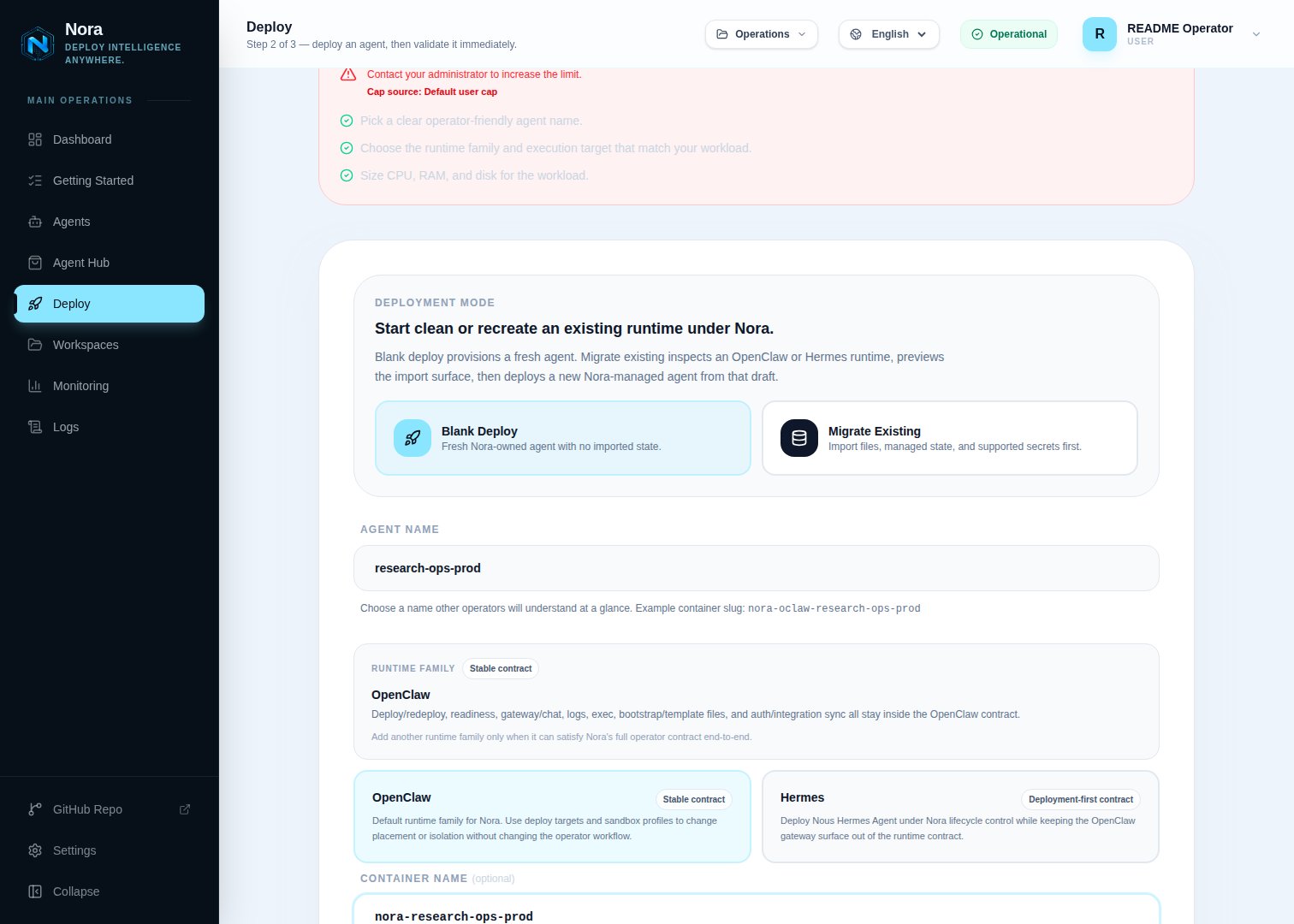 ## Migrate an existing agent
Choose **Migrate** on the Deploy page when you want Nora to recreate an existing OpenClaw or Hermes
agent under control-plane management.
* **Upload a bundle** is the supported path for ordinary operators and cross-host migration. Export
a Nora migration bundle or supported legacy template from the source, upload it, review the draft,
then deploy a fresh Nora-managed runtime.
* **Live Pull** reads through the backend Docker socket and is therefore available only to a platform
admin on a self-hosted control plane. It can inspect a local Docker container; hosted users,
non-admin users, and workspace API keys cannot invoke it.
* **Live SSH pull is disabled.** Nora will not send migration credentials to a host until that path
can require independently verified host-key trust. Export and upload a bundle from remote machines
instead.
Migration recreates the source as a new managed runtime; it does not adopt the original container in
place. Review draft warnings before deployment because unsupported runtime-specific state is not
invented silently.
## What happens during deployment
After you submit the deploy, the deployment moves through three stages:
1. **Queued** — The agent record is created and a deployment job is queued. The status is set to `queued` immediately so you can track progress.
2. **Deploying** — A provisioner worker is creating the workload on the execution target and waiting for readiness.
3. **Running** — Nora has completed provisioning and the runtime passed its readiness path.
If the container cannot start, the status transitions to `error` or `warning`. From either of
those states you can redeploy the agent (see below).
## Lifecycle actions
Once an agent exists you can manage it from its detail page. The following actions are available:
| Action | When available | What it does |
| ------------ | -------------------------------------------------- | ------------------------------------------------------------------------------------- |
| **Start** | Agent has a container but is stopped | Starts the existing container and sets status to `running` |
| **Stop** | Agent is running | Stops the container and sets status to `stopped` |
| **Restart** | Agent has a container | Restarts the container in place and keeps status `running` |
| **Redeploy** | Agent is in `warning`, `error`, or `stopped` state | Clears the old container assignment and queues a fresh deployment with the same specs |
| **Delete** | Any state | Destroys the container (if any) and permanently removes the agent record |
Deleting an agent is irreversible. The container is destroyed and all associated data is removed.
## Access chat, logs, and terminal
## Migrate an existing agent
Choose **Migrate** on the Deploy page when you want Nora to recreate an existing OpenClaw or Hermes
agent under control-plane management.
* **Upload a bundle** is the supported path for ordinary operators and cross-host migration. Export
a Nora migration bundle or supported legacy template from the source, upload it, review the draft,
then deploy a fresh Nora-managed runtime.
* **Live Pull** reads through the backend Docker socket and is therefore available only to a platform
admin on a self-hosted control plane. It can inspect a local Docker container; hosted users,
non-admin users, and workspace API keys cannot invoke it.
* **Live SSH pull is disabled.** Nora will not send migration credentials to a host until that path
can require independently verified host-key trust. Export and upload a bundle from remote machines
instead.
Migration recreates the source as a new managed runtime; it does not adopt the original container in
place. Review draft warnings before deployment because unsupported runtime-specific state is not
invented silently.
## What happens during deployment
After you submit the deploy, the deployment moves through three stages:
1. **Queued** — The agent record is created and a deployment job is queued. The status is set to `queued` immediately so you can track progress.
2. **Deploying** — A provisioner worker is creating the workload on the execution target and waiting for readiness.
3. **Running** — Nora has completed provisioning and the runtime passed its readiness path.
If the container cannot start, the status transitions to `error` or `warning`. From either of
those states you can redeploy the agent (see below).
## Lifecycle actions
Once an agent exists you can manage it from its detail page. The following actions are available:
| Action | When available | What it does |
| ------------ | -------------------------------------------------- | ------------------------------------------------------------------------------------- |
| **Start** | Agent has a container but is stopped | Starts the existing container and sets status to `running` |
| **Stop** | Agent is running | Stops the container and sets status to `stopped` |
| **Restart** | Agent has a container | Restarts the container in place and keeps status `running` |
| **Redeploy** | Agent is in `warning`, `error`, or `stopped` state | Clears the old container assignment and queues a fresh deployment with the same specs |
| **Delete** | Any state | Destroys the container (if any) and permanently removes the agent record |
Deleting an agent is irreversible. The container is destroyed and all associated data is removed.
## Access chat, logs, and terminal
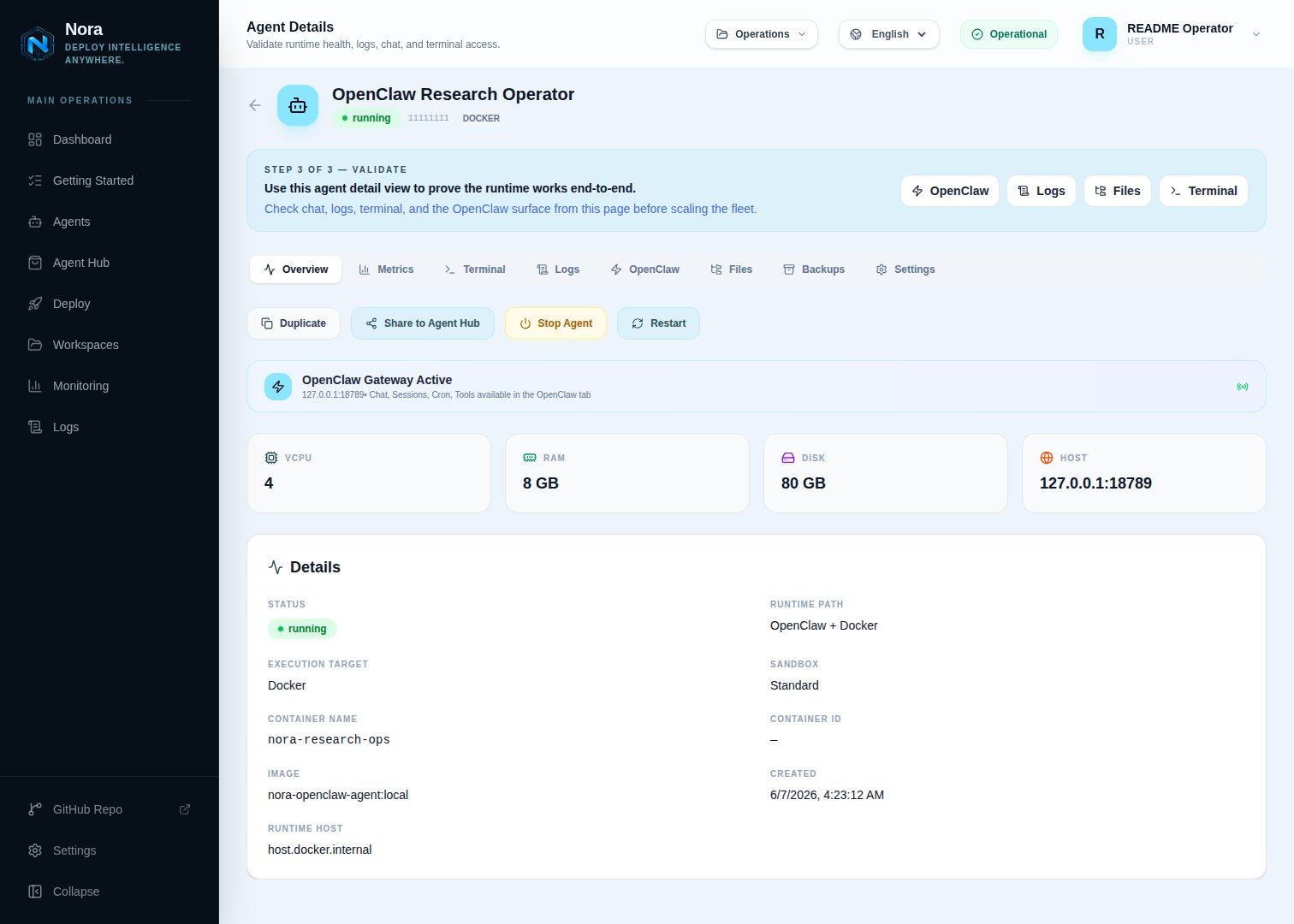 From an agent's detail page you can:
* **Chat** — Send messages to the agent runtime using the OpenClaw chat interface with streaming responses.
* **Logs** — View live and historical log output from the agent container.
* **Terminal** — Open an interactive terminal session connected to the running agent.
The chat and terminal tabs are only available while the agent status is `running`. Logs are accessible regardless of status.
## Sandbox types
Nora supports the GA standard sandbox and the experimental NemoClaw sandbox profile. Choose the one that fits your security and model requirements.
| Feature | Standard sandbox | NemoClaw sandbox |
| ------------------------ | --------------------------- | ------------------------------------------ |
| **Runtime** | OpenClaw + Docker | NemoClaw + OpenClaw |
| **Underlying runtime** | Docker container | Docker-hosted NemoClaw container |
| **Policy controls** | None | OpenShell allow/deny policies |
| **Supported models** | Any configured LLM provider | NVIDIA Nemotron models only |
| **Approval workflow** | No | Yes — operator reviews flagged actions |
| **Operator requirement** | None | `nemoclaw` in `ENABLED_SANDBOX_PROFILES` |
| **Use case** | General-purpose agents | Security-sensitive or compliance workflows |
If you select the NemoClaw sandbox and `nemoclaw` is not included in `ENABLED_SANDBOX_PROFILES` in
your environment, deployment will return an error. Ask your operator to enable it first.
For a full guide to NemoClaw agents, see [Run secure agents with NemoClaw sandboxes](/guides/nemoclaw).
## Related execution targets
* [Choose a provisioner backend](/configuration/provisioner-backends)
* [Connect a Remote Docker host](/guides/remote-docker)
* [Remote Docker backend reference and limitations](/configuration/provisioner-backends/remote-docker)
* [Kubernetes provisioner backend](/configuration/provisioner-backends/kubernetes)
From an agent's detail page you can:
* **Chat** — Send messages to the agent runtime using the OpenClaw chat interface with streaming responses.
* **Logs** — View live and historical log output from the agent container.
* **Terminal** — Open an interactive terminal session connected to the running agent.
The chat and terminal tabs are only available while the agent status is `running`. Logs are accessible regardless of status.
## Sandbox types
Nora supports the GA standard sandbox and the experimental NemoClaw sandbox profile. Choose the one that fits your security and model requirements.
| Feature | Standard sandbox | NemoClaw sandbox |
| ------------------------ | --------------------------- | ------------------------------------------ |
| **Runtime** | OpenClaw + Docker | NemoClaw + OpenClaw |
| **Underlying runtime** | Docker container | Docker-hosted NemoClaw container |
| **Policy controls** | None | OpenShell allow/deny policies |
| **Supported models** | Any configured LLM provider | NVIDIA Nemotron models only |
| **Approval workflow** | No | Yes — operator reviews flagged actions |
| **Operator requirement** | None | `nemoclaw` in `ENABLED_SANDBOX_PROFILES` |
| **Use case** | General-purpose agents | Security-sensitive or compliance workflows |
If you select the NemoClaw sandbox and `nemoclaw` is not included in `ENABLED_SANDBOX_PROFILES` in
your environment, deployment will return an error. Ask your operator to enable it first.
For a full guide to NemoClaw agents, see [Run secure agents with NemoClaw sandboxes](/guides/nemoclaw).
## Related execution targets
* [Choose a provisioner backend](/configuration/provisioner-backends)
* [Connect a Remote Docker host](/guides/remote-docker)
* [Remote Docker backend reference and limitations](/configuration/provisioner-backends/remote-docker)
* [Kubernetes provisioner backend](/configuration/provisioner-backends/kubernetes)