> ## Documentation Index
> Fetch the complete documentation index at: https://noradocs.solomontsao.com/llms.txt
> Use this file to discover all available pages before exploring further.
# Introduction
# Nora
> The self-hosted AI agent ops platform.
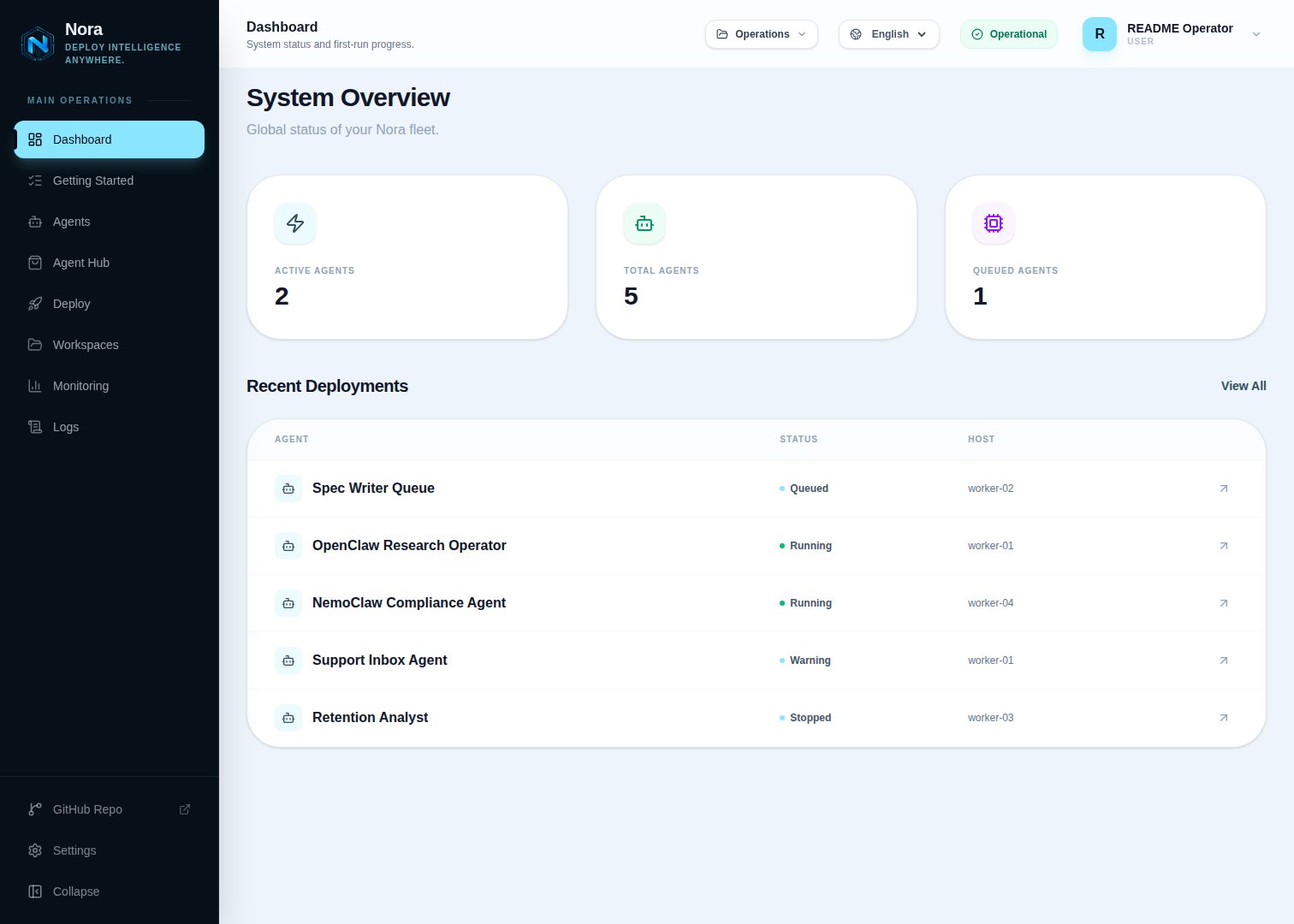
Deploy, monitor, and operate OpenClaw and Hermes runtimes from one operator surface — multi-runtime, Apache 2.0, and on infrastructure you control. Nora gives technical teams a single place to deploy supported agent runtimes into isolated environments, manage LLM provider keys, access chat, logs, terminal, and live filesystem workflows, connect integrations and channels, and monitor runtime activity, all from one dashboard.
The core value is straightforward: if you care about infrastructure control, observability, repeatable operations, and a trustworthy operator surface, Nora gets you to a usable ops platform faster than building one. It is designed for serious operator use — individual builders can run it on a single machine, internal platform teams can standardize on it, and larger teams can keep full infrastructure control without giving up the open-source trust model.
 ## Key capabilities
Launch agent runtimes into isolated environments with configurable CPU and RAM plus
target-specific storage behavior. Docker and Remote Docker retain `disk_gb` as requested
metadata rather than enforcing a filesystem quota. Manage agent lifecycle — deploy, restart,
and remove — from a single operator surface.
Store API keys for Anthropic, OpenAI, Google, and other providers, encrypted at rest with
AES-256-GCM. Sync keys to running runtimes on demand.
Track agent health, queue state, logs, metrics, and runtime activity in real time. Inspect
individual agents or get a system-wide overview from the dashboard.
Wire external tools and configure communication channels directly from the control plane. Manage the full integration surface from one place.
## Who Nora is for
Nora is built for the teams that care about how agent infrastructure runs, not just that it runs.
Teams that need a repeatable, auditable way to deploy and operate agents across their organization without building a control plane from scratch.
Teams that want infrastructure control and observability as first-class features while keeping the
full stack open and inspectable.
Operators running agent infrastructure who need lifecycle management, logs, terminal access, and
runtime monitoring in one surface.
Teams that want to host and operate Nora-based ops platforms for clients on infrastructure they control.
## Positioning pillars
Nora is built around five properties that define what kind of product it is and who it is credible for.
Key encryption, JWT auth, secret generation, and CORS controls are baked in — not bolted on. Nora is designed to feel trustworthy in real operator environments.
On local Docker installs, the fastest path to first proof is short: install, create an operator
account, launch the built-in zero-key demo agent, and validate chat, logs, metrics, and terminal
access. Kubernetes-only installs start with a configured model provider.
[OpenClaw](https://github.com/openclaw/openclaw) is the best-supported runtime today and Hermes is
the second supported family. Runtime contracts, provisioner backends, CLI commands, and MCP tools
are kept in public source so contributors can extend the supported surface without relying on a
private plugin system.
The repo, install scripts, and Docker Compose flow are the primary trust path. Everything you need
to run Nora is in the open repo. You own the infrastructure.
Nora makes sense from single-host Docker evaluation through Kubernetes, private cloud, on-prem,
operator-registered Remote Docker hosts, and AWS / Azure / GCP rollouts. Remote Docker and Proxmox
unprivileged LXC placement are experimental and require validation on the exact infrastructure
before production use. It is not a toy dashboard — it is designed to grow with operator
requirements.
Self-host, modify, use commercially, host for clients, or build integrations on top of Nora. The open-source repo and self-hosted workflow are the center of the product, not a free tier.
## Deployment footprint
Nora is designed to grow with your infrastructure requirements. Lead evaluation with a GA path; experimental and roadmap targets remain clearly labeled.
| Target / profile | Maturity | When to use it |
| ---------------------------- | ------------ | ----------------------------------------------------------------------------------------------------------------------- |
| **Docker** | GA | Fastest local or single-host proof and the recommended first install |
| **Kubernetes** | GA | Cluster-backed placement on k3s, AKS, GKE, or EKS |
| **Remote Docker** | Experimental | Explicit placement on a self-hosted, user-registered Docker machine reached over SSH; private networking required |
| **NemoClaw sandbox profile** | Experimental | NVIDIA/Nemotron-backed secure-sandbox evaluation with explicit contract validation |
| **Proxmox unprivileged LXC** | Experimental | OpenClaw and prepared Hermes images only; secure API TLS and pinned SSH; real-hardware smoke required before production |
Remote Docker is not a capacity scheduler or failover layer. Its connection badge is the stored
result of a manual backend-only test, and operators select one exact `remote:` target per agent.
Review the [Remote Docker guide](/configuration/provisioner-backends/remote-docker) before exposing a
host or sharing it with a workspace.
NemoClaw on Proxmox remains blocked. Do not present Proxmox as GA or as a hardware-isolation path
until the real-hardware release gate is complete.
## Get started
Create an operator account and, when local Docker is enabled, deploy the deterministic demo agent before supplying an external provider key.
Install Nora, create your operator account, launch the demo or add a provider, and validate your
first agent runtime.
Run Nora on your own infrastructure with the installer script or manual Docker Compose setup.
Explore the REST API for agents, providers, integrations, channels, workspaces, and monitoring.
Step-by-step walkthroughs for deploying agents, managing providers, wiring integrations, and more.
Pick a focused issue, improve a runtime or backend contract, or help harden the operator experience.
## Key capabilities
Launch agent runtimes into isolated environments with configurable CPU and RAM plus
target-specific storage behavior. Docker and Remote Docker retain `disk_gb` as requested
metadata rather than enforcing a filesystem quota. Manage agent lifecycle — deploy, restart,
and remove — from a single operator surface.
Store API keys for Anthropic, OpenAI, Google, and other providers, encrypted at rest with
AES-256-GCM. Sync keys to running runtimes on demand.
Track agent health, queue state, logs, metrics, and runtime activity in real time. Inspect
individual agents or get a system-wide overview from the dashboard.
Wire external tools and configure communication channels directly from the control plane. Manage the full integration surface from one place.
## Who Nora is for
Nora is built for the teams that care about how agent infrastructure runs, not just that it runs.
Teams that need a repeatable, auditable way to deploy and operate agents across their organization without building a control plane from scratch.
Teams that want infrastructure control and observability as first-class features while keeping the
full stack open and inspectable.
Operators running agent infrastructure who need lifecycle management, logs, terminal access, and
runtime monitoring in one surface.
Teams that want to host and operate Nora-based ops platforms for clients on infrastructure they control.
## Positioning pillars
Nora is built around five properties that define what kind of product it is and who it is credible for.
Key encryption, JWT auth, secret generation, and CORS controls are baked in — not bolted on. Nora is designed to feel trustworthy in real operator environments.
On local Docker installs, the fastest path to first proof is short: install, create an operator
account, launch the built-in zero-key demo agent, and validate chat, logs, metrics, and terminal
access. Kubernetes-only installs start with a configured model provider.
[OpenClaw](https://github.com/openclaw/openclaw) is the best-supported runtime today and Hermes is
the second supported family. Runtime contracts, provisioner backends, CLI commands, and MCP tools
are kept in public source so contributors can extend the supported surface without relying on a
private plugin system.
The repo, install scripts, and Docker Compose flow are the primary trust path. Everything you need
to run Nora is in the open repo. You own the infrastructure.
Nora makes sense from single-host Docker evaluation through Kubernetes, private cloud, on-prem,
operator-registered Remote Docker hosts, and AWS / Azure / GCP rollouts. Remote Docker and Proxmox
unprivileged LXC placement are experimental and require validation on the exact infrastructure
before production use. It is not a toy dashboard — it is designed to grow with operator
requirements.
Self-host, modify, use commercially, host for clients, or build integrations on top of Nora. The open-source repo and self-hosted workflow are the center of the product, not a free tier.
## Deployment footprint
Nora is designed to grow with your infrastructure requirements. Lead evaluation with a GA path; experimental and roadmap targets remain clearly labeled.
| Target / profile | Maturity | When to use it |
| ---------------------------- | ------------ | ----------------------------------------------------------------------------------------------------------------------- |
| **Docker** | GA | Fastest local or single-host proof and the recommended first install |
| **Kubernetes** | GA | Cluster-backed placement on k3s, AKS, GKE, or EKS |
| **Remote Docker** | Experimental | Explicit placement on a self-hosted, user-registered Docker machine reached over SSH; private networking required |
| **NemoClaw sandbox profile** | Experimental | NVIDIA/Nemotron-backed secure-sandbox evaluation with explicit contract validation |
| **Proxmox unprivileged LXC** | Experimental | OpenClaw and prepared Hermes images only; secure API TLS and pinned SSH; real-hardware smoke required before production |
Remote Docker is not a capacity scheduler or failover layer. Its connection badge is the stored
result of a manual backend-only test, and operators select one exact `remote:` target per agent.
Review the [Remote Docker guide](/configuration/provisioner-backends/remote-docker) before exposing a
host or sharing it with a workspace.
NemoClaw on Proxmox remains blocked. Do not present Proxmox as GA or as a hardware-isolation path
until the real-hardware release gate is complete.
## Get started
Create an operator account and, when local Docker is enabled, deploy the deterministic demo agent before supplying an external provider key.
Install Nora, create your operator account, launch the demo or add a provider, and validate your
first agent runtime.
Run Nora on your own infrastructure with the installer script or manual Docker Compose setup.
Explore the REST API for agents, providers, integrations, channels, workspaces, and monitoring.
Step-by-step walkthroughs for deploying agents, managing providers, wiring integrations, and more.
Pick a focused issue, improve a runtime or backend contract, or help harden the operator experience.