

Nora
The self-hosted AI agent ops platform.Deploy, monitor, and operate OpenClaw and Hermes runtimes from one operator surface — multi-runtime, Apache 2.0, and on infrastructure you control. Nora gives technical teams a single place to deploy supported agent runtimes into isolated environments, manage LLM provider keys, access chat, logs, terminal, and live filesystem workflows, connect integrations and channels, and monitor runtime activity, all from one dashboard. The core value is straightforward: if you care about infrastructure control, observability, repeatable operations, and a trustworthy operator surface, Nora gets you to a usable ops platform faster than building one. It is designed for serious operator use — individual builders can run it on a single machine, internal platform teams can standardize on it, and larger teams can keep full infrastructure control without giving up the open-source trust model.
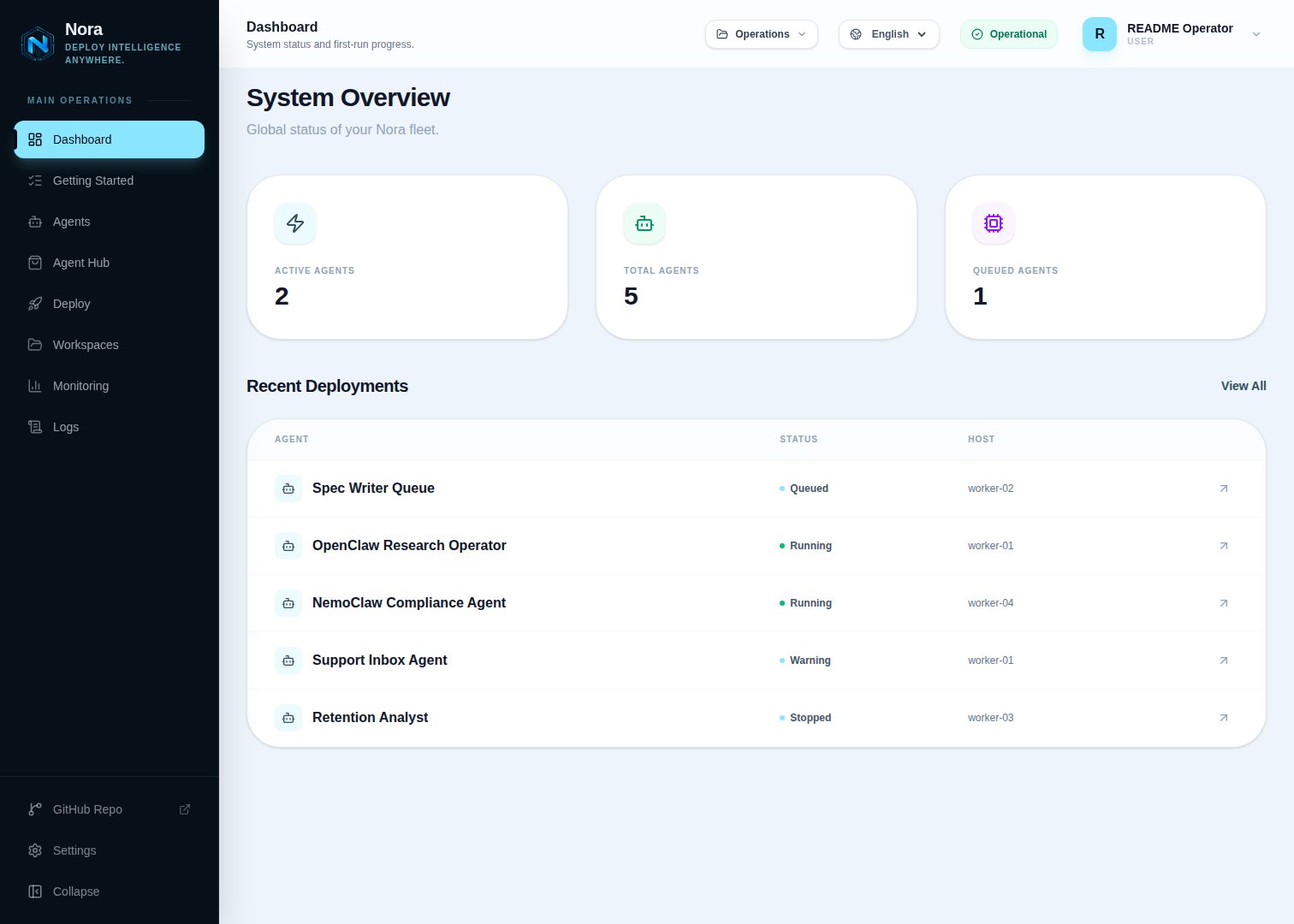
Key capabilities
Deploy agent runtimes
Launch agent runtimes into isolated environments with configurable CPU and RAM plus
target-specific storage behavior. Docker and Remote Docker retain
disk_gb as requested
metadata rather than enforcing a filesystem quota. Manage agent lifecycle — deploy, restart,
and remove — from a single operator surface.Manage LLM provider keys
Store API keys for Anthropic, OpenAI, Google, and other providers, encrypted at rest with
AES-256-GCM. Sync keys to running runtimes on demand.
Monitor operations
Track agent health, queue state, logs, metrics, and runtime activity in real time. Inspect
individual agents or get a system-wide overview from the dashboard.
Integrations and channels
Wire external tools and configure communication channels directly from the control plane. Manage the full integration surface from one place.
Who Nora is for
Nora is built for the teams that care about how agent infrastructure runs, not just that it runs.Internal AI platform teams
Teams that need a repeatable, auditable way to deploy and operate agents across their organization without building a control plane from scratch.
Technical product teams
Teams that want infrastructure control and observability as first-class features while keeping the
full stack open and inspectable.
Ops-minded operators
Operators running agent infrastructure who need lifecycle management, logs, terminal access, and
runtime monitoring in one surface.
Service providers
Teams that want to host and operate Nora-based ops platforms for clients on infrastructure they control.
Positioning pillars
Nora is built around five properties that define what kind of product it is and who it is credible for.Security built in
Key encryption, JWT auth, secret generation, and CORS controls are baked in — not bolted on. Nora is designed to feel trustworthy in real operator environments.
Easy to use
On local Docker installs, the fastest path to first proof is short: install, create an operator
account, launch the built-in zero-key demo agent, and validate chat, logs, metrics, and terminal
access. Kubernetes-only installs start with a configured model provider.
Expandable
OpenClaw is the best-supported runtime today and Hermes is
the second supported family. Runtime contracts, provisioner backends, CLI commands, and MCP tools
are kept in public source so contributors can extend the supported surface without relying on a
private plugin system.
Self-hostable
The repo, install scripts, and Docker Compose flow are the primary trust path. Everything you need
to run Nora is in the open repo. You own the infrastructure.
Enterprise-capable
Nora makes sense from single-host Docker evaluation through Kubernetes, private cloud, on-prem,
operator-registered Remote Docker hosts, and AWS / Azure / GCP rollouts. Remote Docker and Proxmox
unprivileged LXC placement are experimental and require validation on the exact infrastructure
before production use. It is not a toy dashboard — it is designed to grow with operator
requirements.
Apache 2.0 licensed
Self-host, modify, use commercially, host for clients, or build integrations on top of Nora. The open-source repo and self-hosted workflow are the center of the product, not a free tier.
Deployment footprint
Nora is designed to grow with your infrastructure requirements. Lead evaluation with a GA path; experimental and roadmap targets remain clearly labeled.
Remote Docker is not a capacity scheduler or failover layer. Its connection badge is the stored
result of a manual backend-only test, and operators select one exact
remote:<id> target per agent.
Review the Remote Docker guide before exposing a
host or sharing it with a workspace.
Get started
Try the zero-key demo
Create an operator account and, when local Docker is enabled, deploy the deterministic demo agent before supplying an external provider key.
Quick start
Install Nora, create your operator account, launch the demo or add a provider, and validate your
first agent runtime.
Self-hosting
Run Nora on your own infrastructure with the installer script or manual Docker Compose setup.
API reference
Explore the REST API for agents, providers, integrations, channels, workspaces, and monitoring.
Guides
Step-by-step walkthroughs for deploying agents, managing providers, wiring integrations, and more.
Contribute
Pick a focused issue, improve a runtime or backend contract, or help harden the operator experience.