

Nora environment variable reference
Complete reference for every environment variable Nora reads, grouped by category, with required flags, defaults, and configuration guidance.Every Nora deployment is configured through environment variables. Start by copying
.env.example to .env in your project root, then replace all <REPLACE_...> placeholders with real values before starting the stack. The sections below describe every variable Nora reads, grouped by function.
Generate cryptographic secrets with the following command. Never reuse secrets across deployments or commit them to version control.
Required
These variables must be set before the stack will start. Without them, JWTs cannot be signed, stored credentials cannot be encrypted, backup archives cannot be sealed, and Agent Hub source-catalog API keys cannot be hashed.Secret files
Production Compose and Helm deployments mount core credentials read-only under/run/secrets
instead of exposing them to frontend containers. The production control-plane entrypoint loads files
whose names are valid environment-variable names. A non-empty direct environment value takes
precedence; custom orchestrators can use these conventional aliases:
The setup scripts keep
.env owner-only: mode 0600 on macOS/Linux/WSL and a protected,
non-inherited ACL on Windows. Treat timestamped .env.backup-* files with the same sensitivity.
For Compose, setup also materializes the six core values as individual files under
NORA_COMPOSE_SECRETS_DIR (default .secrets/compose). The directory is gitignored and restricted
to the owner; Compose mounts only the requested files read-only into control-plane containers.
Operators who bypass setup must run bash scripts/materialize-compose-secrets.sh <env-file> before
Compose startup and after rotating any core value.
Bootstrap admin account
These variables seed the first administrator account on the very first boot. They are ignored on subsequent starts once an account exists. Both must be set together. An empty hosted PaaS database requires secure explicit values and refuses to start without them; a self-hosted installation may leave both blank and claim the first administrator through/signup. Setting only one is always invalid.
Database
PostgreSQL connection settings. Defaults match the Docker Compose service name and port.Redis and queue
Redis backs BullMQ for deployment, ClawHub install, backup, and alert-delivery jobs.Access and URL
These variables control which nginx configuration is mounted, the listening port, and the public-facing base URL.API request rate limits
App-wide per-IP abuse protection sits in front of every route: a generous global budget for all traffic plus a tighter budget for state-changing methods (POST/PUT/PATCH/DELETE). Overrides must be positive integers; invalid values fall back to the secure defaults below. Raise them only where many requests legitimately share one source IP — for example the Playwright E2E suite, which drives the whole API from a single localhost address and otherwise self-throttles.Login abuse protection
Password and OAuth login share one per-IP rate-limit budget. Overrides must be positive integers; invalid values fall back to the secure defaults below.OAuth
OAuth login is disabled by default. SetOAUTH_LOGIN_ENABLED=true along with provider credentials to enable it. Provider verification must be completed in the relevant developer consoles before these values take effect.
Public signup abuse protection
Signup remains public, but Nora bounds signup spikes with dedicated app-level rate limits and a runtime bot challenge. Self-hosted operators may explicitly opt out; hosted PaaS signup fails closed until Turnstile or reCAPTCHA is fully configured.
The signup page reads this configuration at runtime from
GET /api/auth/bootstrap-status, so published frontend images do not need provider-specific build arguments. Existing NEXT_PUBLIC_SIGNUP_BOT_PROTECTION_PROVIDER, NEXT_PUBLIC_SIGNUP_TURNSTILE_SITE_KEY, and NEXT_PUBLIC_SIGNUP_RECAPTCHA_SITE_KEY values remain accepted as deprecated runtime aliases; setup migrates their values into the canonical names above.
Release tracking and upgrades
Drives the admin “release available” banner and the one-click upgrade runner. SettingNORA_GITHUB_REPO enables Nora to compare the running version against the latest published GitHub release.
The former built-in
40 attempts / 3 seconds pair is treated as a legacy default and upgraded to 221 / 3; other valid custom pairs are preserved.
System banner
Platform mode
Self-hosted resource limits
These variables are only read whenPLATFORM_MODE=selfhosted. They define the maximum resources any single user can request when deploying an agent.
Billing / Stripe
These variables are only read whenPLATFORM_MODE=paas. See Platform modes for a full explanation of PaaS mode.
Runtime selection
Runtime selection is three-dimensional: runtime family × deploy target × sandbox profile. Each enabled-list variable accepts a comma-separated list. The first id in each list is the default for new deployments. See Provisioner backends for details.Kubernetes registry and Compose mount helpers
Nora no longer creates Kubernetes execution targets from.env labels. Register every Kubernetes cluster in Admin -> Kubernetes. Each enabled row becomes a concrete execution target such as k8s:aks-eastus2 and stores its provider, actual cluster name, kubeconfig, namespaces, exposure mode, Service annotations, load-balancer source ranges, and load-balancer class.
docker-compose.kubernetes.yml only mounts a kubeconfig directory into the Nora containers. Put one or more kubeconfig files under NORA_KUBECONFIGS_DIR, then enter /kubeconfigs/<file> as each Admin Kubeconfig path. The Admin path must be the path visible inside backend-api and worker-provisioner, not the host path.
For more than one cluster, put multiple kubeconfig files under NORA_KUBECONFIGS_DIR. The Kubernetes overlay mounts that directory at /kubeconfigs, so two AKS clusters can use Admin paths such as /kubeconfigs/aks-eastus2 and /kubeconfigs/aks-westus2 while both still run through docker-compose.kubernetes.yml.
Admin-registered encrypted kubeconfigs require
ENCRYPTION_KEY because Nora stores pasted kubeconfig content encrypted at rest.
Docker agent published ports
Docker and remote-Docker agents reserve their published gateway ports in PostgreSQL. The configurable subrange must remain inside19000-19999, which is already allowed by the gateway proxy’s default SSRF guard. Local Docker deployments skip ports published by running containers and retry a bounded number of bind conflicts, including conflicts caused by non-Docker listeners.
Gateway proxy SSRF guard
Defaults allow OpenClaw’s internal gateway port, Docker-published 19000-19999, and Kubernetes NodePort 30000-32767. Override only if you publish gateways on non-default ports or hosts.Remote Docker safety and authorization
Active Remote Docker gateway, log, and terminal streams periodically re-check that the agent owner still owns the host or has aneditor, admin, or owner workspace grant. Lower values reduce the
window before those streams close after revocation, at the cost of more authorization queries.
Remote-host create, edit, Test, SSH-pin reset, delete, share, and unshare operations are serialized
per host id so concurrent ownership, grant, trust, or credential mutations cannot race across
backend replicas.
Proxmox
Proxmox is an opt-in experimental LXC target for standard OpenClaw and prepared Hermes images. Keep Docker enabled while validating it, use verified API TLS and pinned SSH host keys, and run the real-host smoke before production use. NemoClaw on Proxmox remains blocked.NemoClaw / NVIDIA
Read whenENABLED_SANDBOX_PROFILES includes nemoclaw.
OpenClaw runtime
These variables tune the OpenClaw runtime image and gateway. Most operators leave them at their defaults; override when running a forked OpenClaw build or pinning to a specific image.
When
OPENCLAW_DOCKER_PACKAGE is overridden for NemoClaw, NEMOCLAW_SANDBOX_IMAGE must reference a
prebuilt image containing the same exact OpenClaw version. The non-root NemoClaw runtime fails
closed on a version mismatch instead of replacing the global package inside the sandbox.
Hermes runtime
Agent Hub source catalog
Configure where Agent Hub fetches community templates from. Internal templates are seeded automatically.Workspace invitations
Integrations
Managed backups
NORA_BACKUP_STORAGE selects the destination. Supported values: local (default volume), s3, r2, ssh. Leave the destination credentials empty to manage them through Admin Settings instead of .env.
S3-compatible
UseNORA_BACKUP_STORAGE=s3 for AWS S3 or any S3-compatible service. Set NORA_BACKUP_S3_ENDPOINT for non-AWS providers.
Cloudflare R2
UseNORA_BACKUP_STORAGE=r2. Set NORA_BACKUP_R2_ENDPOINT to your account endpoint, e.g. https://<account-id>.r2.cloudflarestorage.com.
SSH / SFTP
UseNORA_BACKUP_STORAGE=ssh.
Security
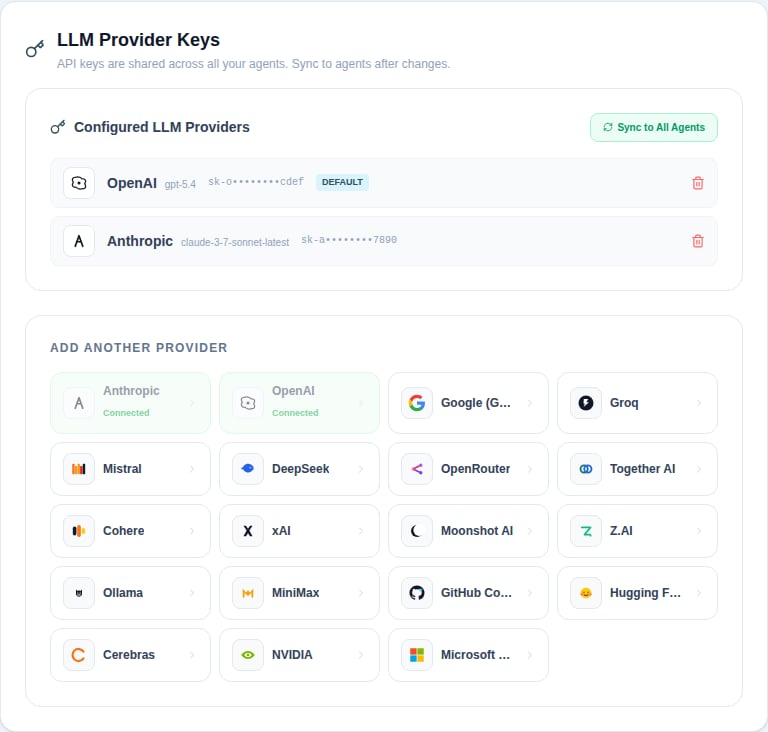
LLM key storage
TLS
Optional; only relevant when nginx terminates TLS directly inside the stack.Marketing analytics
Optional privacy-light analytics for the public marketing site, powered by Plausible. Off by default — self-hosted deployments ship zero tracking unlessNEXT_PUBLIC_ANALYTICS_DOMAIN is set at build time.
Cost reporting
These optional rates drive the Cost dashboards. Nora estimates spend from token usage recorded by OpenClaw, Hermes, and future runtime chat paths.
Example:
input_per_1k and output_per_1k when Nora records prompt/completion token splits. Use per_1k for total-token-only pricing.
Legacy AWS backup variables
These variables are read by older platform-settings code paths for backward compatibility. New deployments should use theNORA_BACKUP_S3_* family above instead.