

Managed agent backups
Snapshot an agent’s persistent state on demand or on a schedule, store the encrypted archive locally or in S3 / R2 / SSH, and restore from any backup into a new agent.Nora’s managed-backup tier captures an agent’s container state — files, integrations, and runtime data — into an encrypted archive and stores it in the destination you configure. Backups run as BullMQ jobs in a dedicated worker so deploys aren’t impacted. Restores create a new agent from the archive (in-place restore is admin-only and not exposed via the public API).
Storage destinations
NORA_BACKUP_STORAGE selects where archives go. Supported values:
Credentials can be set via env at startup or managed at runtime from Admin Settings → Backups. See the environment variable reference for the full list.
Capture an on-demand backup
1
Open the agent detail page
Navigate to the agent you want to back up.
2
Open the Backups panel
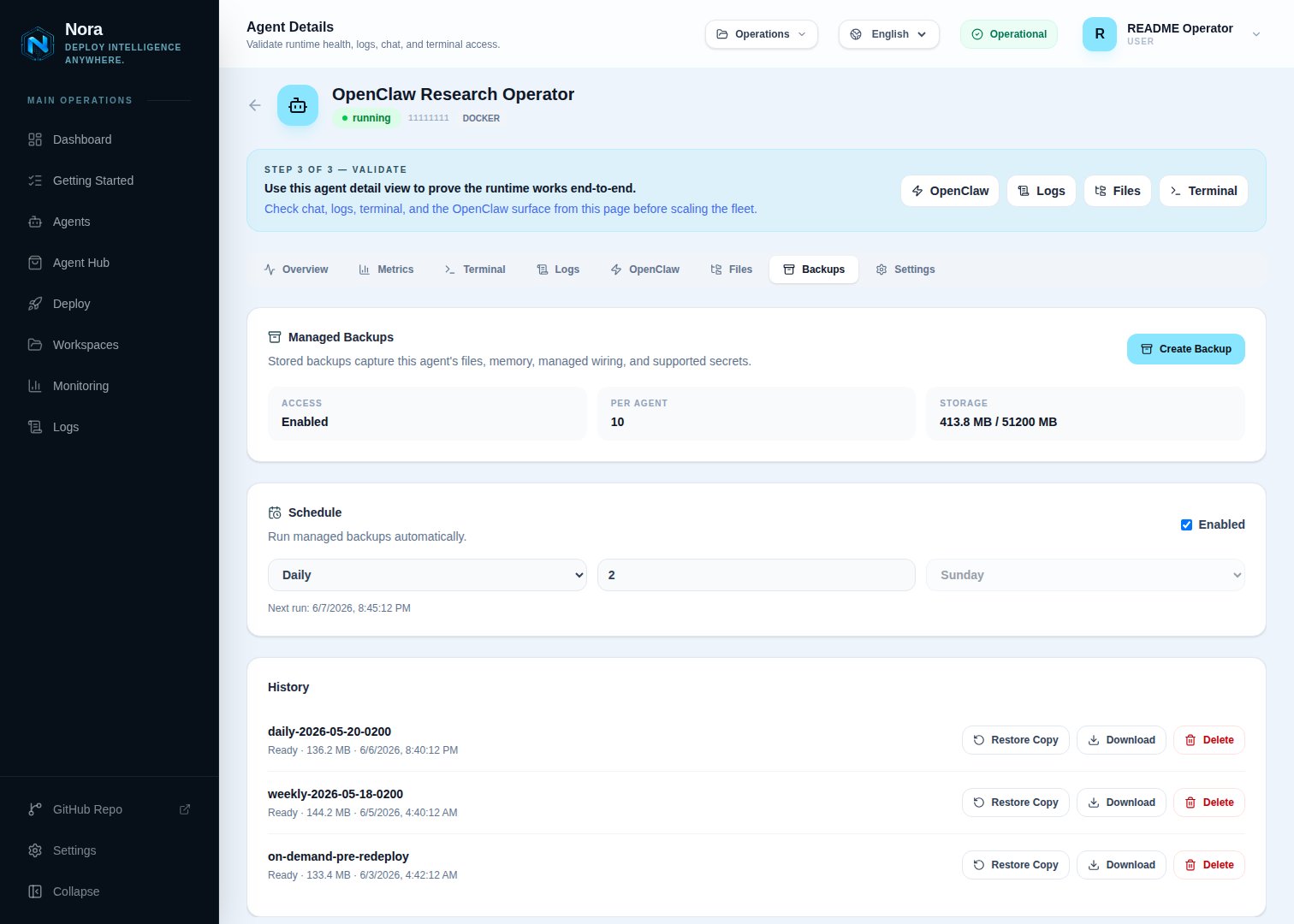
Click Backups in the agent’s secondary navigation. The panel shows existing backups with their
size, creation time, and status.
3
Click New backup
Optionally name the backup (defaults to a timestamped label). Confirm. Nora queues a backup job on the
backups queue and the panel shows it as queued. The backup worker (workers/backup) picks it up, snapshots the agent state, encrypts the archive, and uploads it to the configured destination.Backup jobs have a hard
Promise.race timeout of NORA_BACKUP_JOB_TIMEOUT_MS (default 30 minutes). Long-running snapshots are aborted at the timeout — agents holding open large datasets may need a higher value.4
Wait for completion
The backup transitions through
queued → running → ready / ready_with_warnings (or failed). When complete, the Download action becomes available.Schedule recurring backups
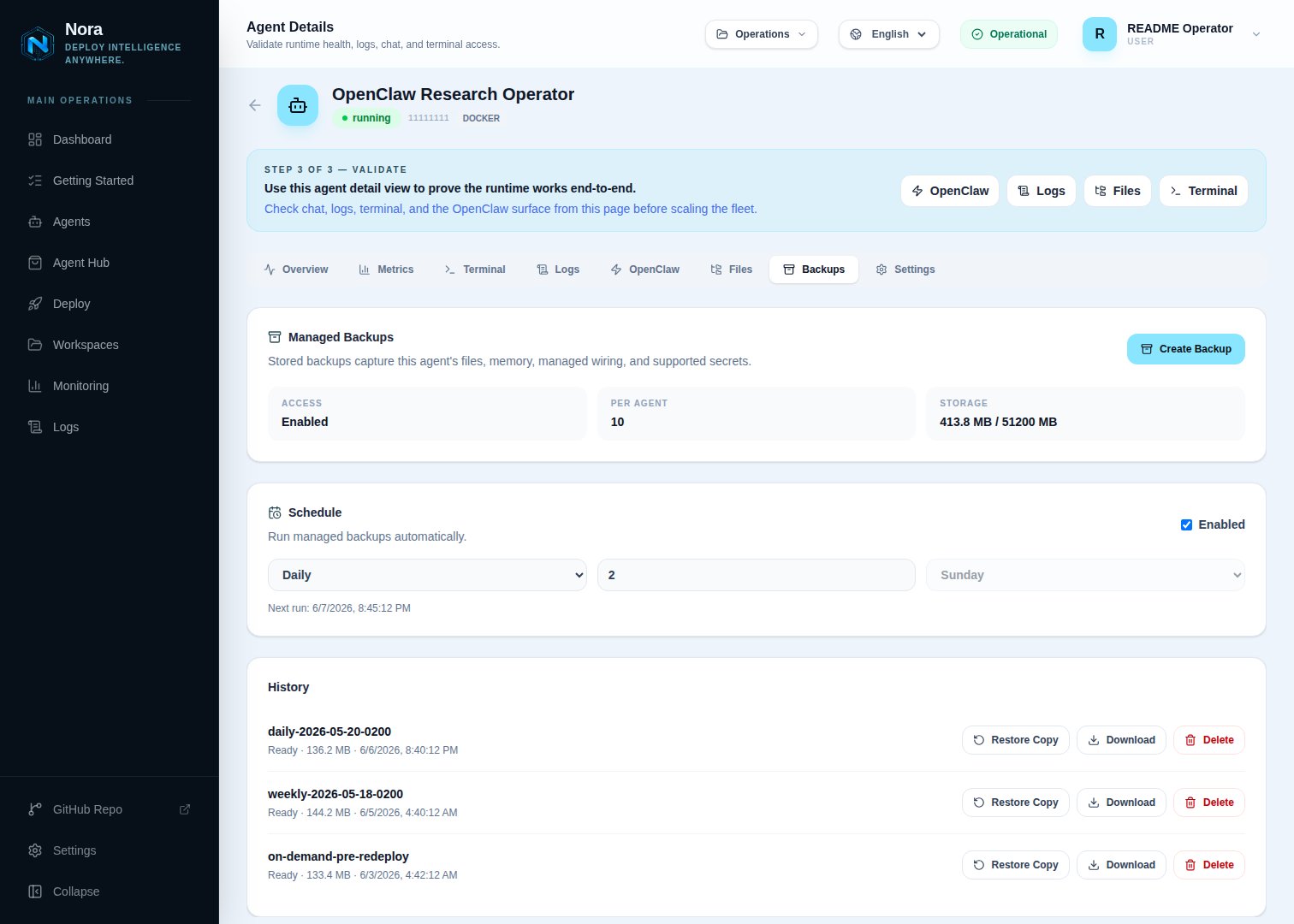
The backup worker polls every
NORA_BACKUP_SCHEDULE_POLL_MS (default 60 seconds) for due schedules and enqueues a job for each. Manual backups don’t count against the scheduled retention.
Restore from a backup
The public API exposes copy restore only — it materializes the backup into a new agent in your workspace, leaving the original agent untouched.1
Click Restore on a backup row
From the agent’s Backups panel, click the Restore action on any
ready (or ready_with_warnings) backup.2
Confirm the destination
Choose the workspace and an agent name for the restored copy. Click Create restore draft.
3
Review the draft
Nora creates a new agent in
queued status seeded from the backup’s snapshot. The deploy follows the standard agent lifecycle — verify the agent reaches running, then point traffic at it.stopped with no stale container or gateway
identity. If a racing replacement runtime cannot be destroyed safely, Nora leaves the agent in
warning with its cleanup identity retained for operator recovery. Fix the cause, reconcile any
warning state, and retry the restore.
Retention and limits
Two settings cap storage usage:
PaaS deployments override these per subscription tier. See Platform modes.
Permissions
Troubleshooting
Backup stays in 'queued' forever
Backup stays in 'queued' forever
Check that the
worker-backup container is running. Its health endpoint is http://worker-backup:4002/health. If unhealthy, the BullMQ backups queue has nothing draining it.Restore archive fails to decrypt
Restore archive fails to decrypt
NORA_BACKUP_ENCRYPTION_KEY was rotated. Old archives can’t be decrypted with a new key. Roll the
key back temporarily, restore, then re-key. There’s no recovery path if both the old key and a
copy of the archive are lost.S3/R2 upload fails with 403
S3/R2 upload fails with 403
Verify the bucket policy allows
s3:PutObject for the configured access key on the bucket and
prefix Nora is writing to. Cloudflare R2 also requires the account-specific endpoint URL, not the
AWS endpoint.SSH upload hangs
SSH upload hangs
The SSH destination uses sftp under the hood. Check that the remote user can write to
NORA_BACKUP_SSH_REMOTE_PATH and that the host is reachable from inside the worker-backup container.