

Set up Echo, the personal-branding agent
Install the Echo Agent Hub template, connect X and/or LinkedIn, connect one channel, and run the bootstrap that learns your voice. Echo drafts posts and replies in your voice for X, LinkedIn, or both — then publishes original posts after you approve final text.Echo is a ghostwriting-oriented Agent Hub template for X and LinkedIn. It runs a guided bootstrap, builds a
VOICE.md from your real writing samples, drafts multiple post angles, prepares engagement replies for review, and keeps platform-specific playbooks close to the daily workflow. Original posts can go out after your explicit approval; nothing is published or sent on its own.
You can run Echo for X only, LinkedIn only, or both — the platform you pick during bootstrap drives everything downstream.
Before you install
1
A running Nora instance with dashboard access
You’ll connect integrations and channels from the agent’s detail page, so you need
editor
access to the destination workspace.2
Decide which platform(s) to manage
X only, LinkedIn only, or both. You can start with one and add the other later — it’s not a
permanent choice.
3
Have 5+ writing samples ready
Real posts, emails, or texts that sound like you. Echo extracts your voice from these during
bootstrap. Quality matters more than format.
Step 1 — Install Echo from Agent Hub
From the dashboard, open Agent Hub, find the Echo Personal Branding listing (under the Built-in filter), and click Install. Pick a workspace and agent name. Nora materializes the template’s files into a new agent. See Publish and install Agent Hub templates for the general install flow.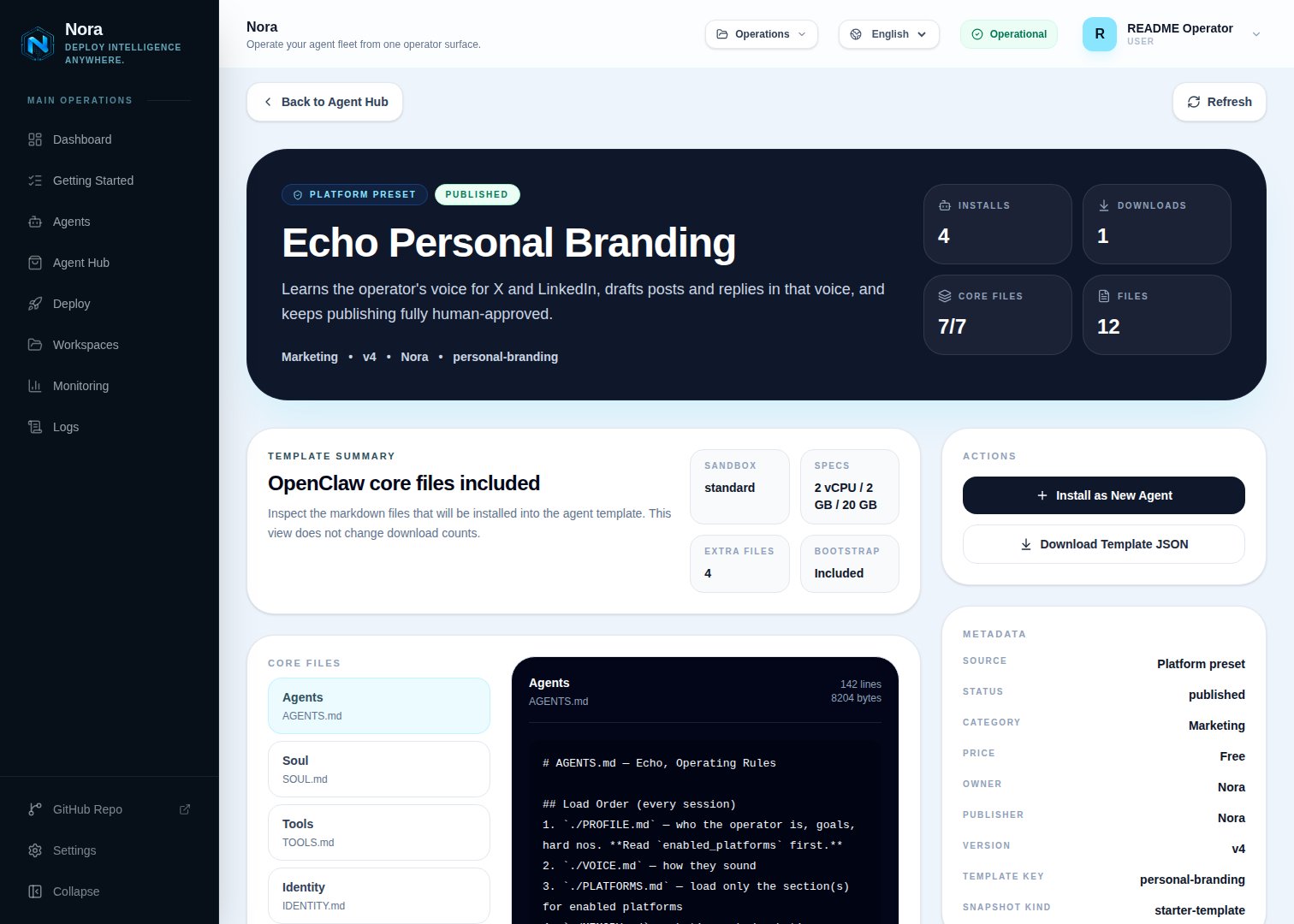
Agent Hub — Echo Personal Branding template detail before installation
Step 2 — Connect your platform(s)
Open the agent → Integrations tab. Connect at least one of the two platforms — only the one(s) you plan to manage.Twitter / X
Click Authorize with X. Requires an X OAuth 2.0 app with the
tweet.read,
tweet.write, users.read, and offline.access scopes.Click Authorize with LinkedIn. Requires a LinkedIn developer app with the
openid, profile, email, and w_member_social
scopes.The OAuth app setup (registering the redirect URI, copying the Client ID/Secret) is covered in the
per-provider guides linked above. Nora runs the full authorize → callback flow — you never paste a
long-lived token.
integrations/NORA_INTEGRATIONS.md into the agent’s workspace and updates TOOLS.md. Echo reads that file to know what’s connected — you never edit it by hand.
Step 3 — Connect one channel
Echo needs one communication channel to reach you with briefs, drafts, and approval requests. This lives in the Channels tab — a different tab from Integrations. WhatsApp is the recommended example:1
Link WhatsApp in Nora
Open the agent -> Channels tab -> WhatsApp -> Link.
2
Scan the QR code
Complete the pairing prompt from WhatsApp. OpenClaw WhatsApp uses QR/link pairing, not a
Phone Number ID and access-token form.
3
Confirm the channel
Return when Nora shows the channel linked or connected.
Step 4 — Run the bootstrap
Start the runtime and send any first message (“hey” works). Echo introduces herself and what she does, then walks through setup (~15–20 min):- Names herself. The default name is Echo, but the first thing bootstrap does is ask what you’d like to call the agent — reply with any name, or keep “Echo.” Whatever you pick is used from then on and saved to
PROFILE.md. - Captures who you are and what you want to be known for
- Asks which platform(s) to manage and collects handles only for those
- Confirms your platform integration(s) are connected (sends you back to the Integrations tab if not)
- Learns your voice from 5+ samples and writes
VOICE.md - Captures cadence, goals, and hard-no topics
- Drafts a test post so you can calibrate
Single platform vs. both
Your choice in bootstrap (enabled_platforms) cascades through every behavior file. Echo never acts on a platform you didn’t enable.
Started with one and want the other? Just tell Echo “add X” or “add LinkedIn” — she’ll walk you through connecting it and switch on its workflows.
What Echo will and won’t do
- Approval-gated publishing. Echo drafts; you approve final text; Echo can post approved original content through connected X/LinkedIn integrations. There is no auto-posting and no auto-engagement.
- Approval every time. Publishing each original post requires your explicit live approval — prior approval never carries over.
- Engagement stays manual. DMs, replies, comments, profile changes, follows, likes, reposts, and connection actions remain draft/recommend-only.
- Hard nos are absolute. Topics you list during bootstrap are never drafted.
API limits
- X: the free API tier is very limited for reads. Analytics pulls need the Premium API or manual dashboard exports.
- LinkedIn: the API is restrictive; most operators paste analytics screenshots for Echo to parse during the weekly review.
- Either way, drafting works without API access — auto-pulled analytics and approval-gated posting require the platform integration.
Troubleshooting
OAuth fails on the X or LinkedIn consent screen
OAuth fails on the X or LinkedIn consent screen
I pasted a token into the chat by mistake
I pasted a token into the chat by mistake
Rotate it immediately (in the provider’s developer console or, for a channel, the provider’s app), then enter the replacement in the correct tab — Integrations for X/LinkedIn, Channels for Telegram/Slack/etc. Echo never stores credentials from chat.